← Back to blog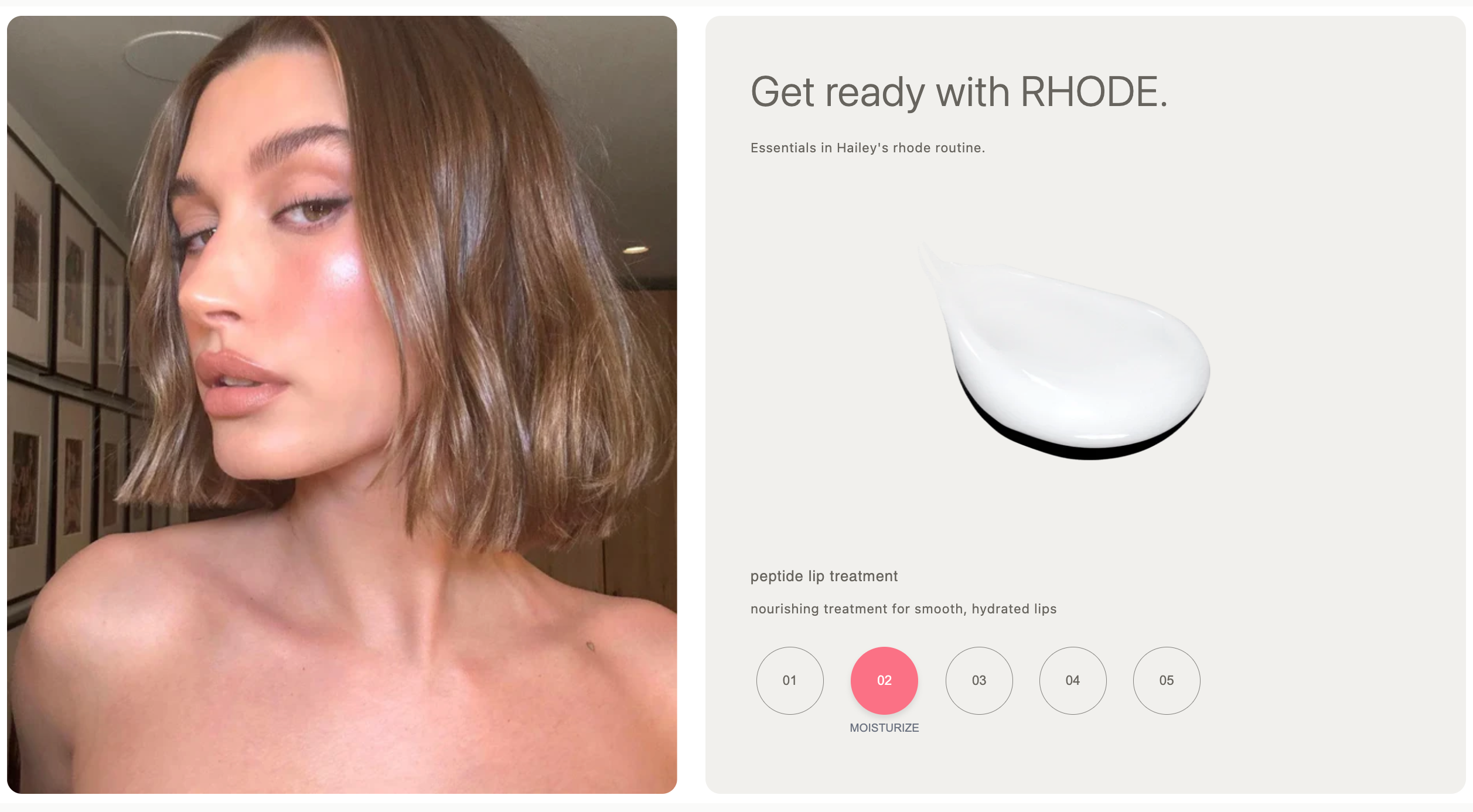
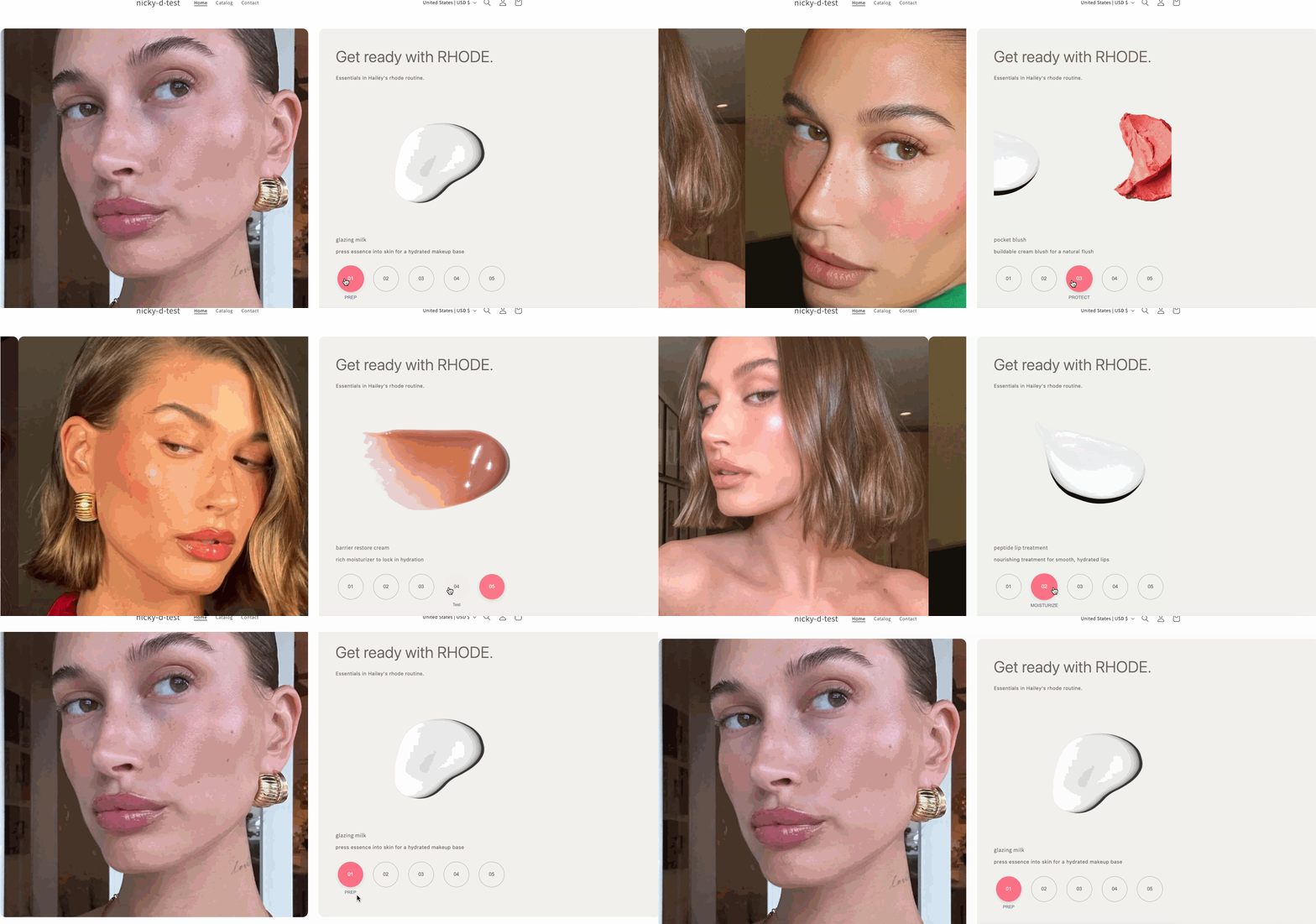
If you’ve ever visited Hailey Bieber’s Rhode store, you’ve probably noticed the beautiful dual carousel section that showcases both product images and lifestyle portraits side by side. This interactive section is a fantastic way to highlight your products and create a premium, editorial feel for your brand.
In this tutorial, I’ll show you how to add a similar dual carousel section to your Shopify store—no app required! We’ll use Shopify’s theme customizer and a custom Liquid section.
Code: https://github.com/ndrishinski/blogs/blob/master/dual-carousel-image-section/sections/dual-carousel.liquid
Shopify Design Hacks: Dual Carousel Section Inspired by Hailey Bieber
By Nicholas Drishinski ·
Prefer Video?
Enjoy, otherwise read on!
What You’ll Build
- A dual carousel: One side displays a portrait/lifestyle image carousel, the other side shows product images and info.
- Step navigation: Hovering over each step updates both carousels and the product info.
- Fully customizable: Easily update images, product names, descriptions, and step labels from the Shopify theme editor.
Step 1: Get the Section Code
First, you’ll need the custom section code. You can copy the code below, or if you’re using the code from this repo, use the file at: https://github.com/ndrishinski/blogs/blob/master/dual-carousel-image-section/sections/dual-carousel.liquid
<style>
  #dual-carousel-section img {
    border-radius: 16px !important;
  }

  #dual-carousel-section {
    background-attachment: scroll !important;
    background-clip: border-box !important;
    background-color: rgb(255, 255, 255) !important;
    background-image: none !important;
    background-origin: padding-box !important;
    background-position-x: 0 !important;
    background-position-y: 0 !important;
    background-repeat: repeat !important;
    background-size: auto !important;
    box-sizing: border-box !important;
    column-gap: 30px !important;
    display: flex !important;
    font-family: -apple-system
    , "system-ui"
    , "Segoe UI"
    , Roboto
    , sans-serif !important;
    height: 850px !important;
    margin: 0 !important;
    min-height: 0 !important;
    padding: 10px !important;
    row-gap: 30px !important;
    unicode-bidi: isolate !important;
  }

  #dual-carousel-section .portrait-section {
    display: block !important;
    flex-basis: 0 !important;
    flex-grow: 1 !important;
    flex-shrink: 1 !important;
    font-family: -apple-system: "system-ui"
    , "Segoe UI"
    , Roboto
    , sans-serif !important;
    height: 830px !important;
    overflow-x: hidden !important;
    overflow-y: hidden !important;
    position: relative !important;
    unicode-bidi: isolate !important;
    width: 503px !important;
  }

  #dual-carousel-section .portrait-carousel {
    display: flex !important;
    width: 500% !important;
    height: 100% !important;
    transition: transform 0.4s ease-out !important;
  }

  #dual-carousel-section .portrait-slide {
    width: 20% !important;
    height: 100% !important;
    flex-shrink: 0 !important;
  }

  #dual-carousel-section .portrait-image {
    width: 100% !important;
    height: 100% !important;
    object-fit: cover !important;
    border-radius: 16px !important;
  }

  #dual-carousel-section .content-section {
    background-attachment: scroll !important;
    background-clip: border-box !important;
    background-color: rgb(241, 240, 237) !important;
    background-image: none !important;
    background-origin: padding-box !important;
    background-position-x: 0 !important;
    background-position-y: 0 !important;
    background-repeat: repeat !important;
    background-size: auto !important;
    border-bottom-left-radius: 16px !important;
    border-bottom-right-radius: 16px !important;
    border-top-left-radius: 16px !important;
    border-top-right-radius: 16px !important;
    display: flex !important;
    flex-basis: 0 !important;
    flex-direction: column !important;
    flex-grow: 1 !important;
    flex-shrink: 1 !important;
    font-family: -apple-system
    , "system-ui"
    , "Segoe UI"
    , Roboto
    , sans-serif !important;
    height: 830px !important;
    justify-content: center !important;
    padding: 48px !important;
    unicode-bidi: isolate !important;
  }

  #dual-carousel-section .content-wrapper {
    display: block !important;
    font-family: -apple-system
    , "system-ui"
    , "Segoe UI"
    , Roboto
    , sans-serif !important;
    height: 743.094px !important;
    max-width: 512px !important;
    unicode-bidi: isolate !important;
    width: 503px !important;
  }

  #dual-carousel-section .header {
    display: flex !important;
    justify-content: center !important;
    flex-direction: column !important;
    font-family: -apple-system
    , "system-ui"
    , "Segoe UI"
    , Roboto
    , sans-serif !important;
    height: 84.25px !important;
    margin-bottom: 64px !important;
    unicode-bidi: isolate !important;
    width: 503px !important;
  }

  #dual-carousel-section .title {
    color: rgb(103, 100, 94) !important;
    display: block !important;
    font-family: -apple-system
    , "system-ui"
    , "Segoe UI"
    , Roboto
    , sans-serif !important;
    font-size: 44.8px !important;
    font-weight: 300 !important;
    height: 53.75px !important;
    line-height: 53.76px !important;
    margin-block-end: 8px !important;
    margin-block-start: 30.016px !important;
    margin-bottom: 8px !important;
    margin-inline-end: 0 !important;
    margin-inline-start: 0 !important;
    unicode-bidi: isolate !important;
    width: 503px !important;
  }

  #dual-carousel-section .subtitle {
    color: rgb(103, 100, 94) !important;
    display: block !important;
    font-family: -apple-system
    , "system-ui"
    , "Segoe UI"
    , Roboto
    , sans-serif !important;
    font-size: 14px !important;
    height: 16.5px !important;
    margin-block-end: 14px !important;
    margin-block-start: 14px !important;
    margin-inline-end: 0 !important;
    margin-inline-start: 0 !important;
    unicode-bidi: isolate !important;
    width: 503px !important;
  }

  #dual-carousel-section .product-section {
    border-bottom-left-radius: 16px !important;
    border-bottom-right-radius: 16px !important;
    border-top-left-radius: 16px !important;
    border-top-right-radius: 16px !important;
    display: block !important;
    font-family -apple-system
    , "system-ui"
    , "Segoe UI"
    , Roboto
    , sans-serif !important;
    height: 443.828px !important;
    margin-bottom: 32px !important;
    unicode-bidi: isolate !important;
    width: 503px !important;
  }

  #dual-carousel-section .product-container {
    color: rgb(103, 100, 94) !important;
    font-family: -apple-system
    , "system-ui"
    , "Segoe UI"
    , Roboto
    , sans-serif !important;
    display: block !important;
    height: 367.234px !important;
    margin-bottom: 24px !important;
    min-height: 300px !important;
    overflow-x: hidden !important;
    overflow-y: hidden !important;
    position: relative !important;
    unicode-bidi: isolate !important;
    width: 503px !important;
  }

  #dual-carousel-section .product-carousel {
    display: flex !important;
    width: 500% !important;
    height: 100% !important;
    transition: transform 0.4s ease-out !important;
  }

  #dual-carousel-section .product-slide {
    width: 20% !important;
    height: 100% !important;
    flex-shrink: 0 !important;
  }

  #dual-carousel-section .product-image {
    width: 100% !important;
    height: 100% !important;
    border-radius: 0 !important;
    display: flex !important;
    align-items: center !important;
    justify-content: center !important;
    border: 1px solid rgb(241, 240, 237) !important;
  }

  #dual-carousel-section .product-info {
    transition: opacity 0.3s ease-out !important;
  }

  #dual-carousel-section .product-info.transitioning {
    opacity: 0.6 !important;
  }

  #dual-carousel-section .product-name {
    color: rgb(103, 100, 94) !important;
    font-weight: 500 !important;
    margin-bottom: 4px !important;
    font-size: 16px !important;
  }

  #dual-carousel-section .product-description {
    color: rgb(103, 100, 94) !important;
    font-size: 14px !important;
    line-height: 1.4 !important;
  }

  #dual-carousel-section .steps-container {
    display: flex !important;
    align-items: center !important;
    gap: 16px !important;
    padding-bottom: 5px !important;
  }

  #dual-carousel-section .step-button {
    display: flex !important;
    flex-direction: column !important;
    align-items: center !important;
    background: none !important;
    border: none !important;
    cursor: pointer !important;
    transition: all 0.1s ease !important;
  }

  #dual-carousel-section .step-button:hover {
    transform: scale(1.05) !important;
  }

  #dual-carousel-section .step-button:not(.active):hover {
    opacity: 0.7 !important;
  }

  #dual-carousel-section .step-circle {
    width: 72px !important;
    height: 72px !important;
    border-radius: 50% !important;
    display: flex !important;
    align-items: center !important;
    justify-content: center !important;
    font-weight: 500 !important;
    font-size: 14px !important;
    margin-bottom: 8px !important;
    transition: all 0.1s ease !important;
  }

  #dual-carousel-section .step-circle.active {
    background: #fb7185 !important;
    color: white !important;
    box-shadow: 0 4px 6px rgba(0, 0, 0, 0.1) !important;
  }

  #dual-carousel-section .step-circle.inactive {
    border: 1px solid rgb(132, 130, 126) !important;
    color: rgb(103, 100, 94) !important;
  }

  #dual-carousel-section .step-circle.inactive:hover {
    border-color: rgb(132, 130, 126) !important;
  }

  #dual-carousel-section .step-label {
    color: #6b7280 !important;
    font-size: 12px !important;
    font-weight: 500 !important;
    height: 0 !important;
  }

  @media (max-width: 768px) {
    .carosel-wrapper-whole {
      min-height: 1400px !important;
    }


    #dual-carousel-section {
      flex-direction: column !important;
      min-height: 100vh !important;
      grid-gap: 15px !important;
    }

    #dual-carousel-section .portrait-section {
      flex: none !important;
      height: 411px !important;
      order: 1 !important;
      width: auto !important;
    }

    #dual-carousel-section .content-section {
      flex: none !important;
      order: 2 !important;
      padding: 32px 24px !important;
      justify-content: flex-start !important;
      min-height: 411px !important;
    }

    #dual-carousel-section .content-wrapper {
      width: auto !important;
      height: auto !important;
    }

    #dual-carousel-section .header {
      margin-bottom: 34px !important;
      height: auto !important;
      width: auto !important;
      padding: 0 !important;
    }

    #dual-carousel-section .title {
      font-size: 30px !important;
      height: auto !important;
      width: auto !important;
      line-height: normal !important;
      margin-top: 0 !important;
      margin-bottom: 8px !important;
    }

    #dual-carousel-section .subtitle {
      height: auto !important;
      width: auto !important;
      line-height: normal !important;
    }

    #dual-carousel-section .product-section {
      height: auto !important;
      width: auto !important;
      margin-bottom: 32px !important;
    }

    #dual-carousel-section .product-container {
      margin: 0 auto 24px !important;
      height: auto !important;
      width: auto !important;

    }

    #dual-carousel-section .steps-container {
      gap: 12px !important;
      justify-content: center !important;
    }

    #dual-carousel-section .step-circle {
      width: 40px !important;
      height: 40px !important;
      font-size: 12px !important;
    }
  }

  @media (max-width: 480px) {
    .carosel-wrapper-whole {
      min-height: 1150px !important;
    }

    #dual-carousel-section {
      grid-gap: 7.5px !important;
    }

    #dual-carousel-section .content-section {
      padding: 24px 16px !important;
    }

    #dual-carousel-section .title {
      font-size: 24px !important;
    }

    #dual-carousel-section .product-container {
      height: auto !important;
      min-height: auto !important;
    }

    #dual-carousel-section .steps-container {
      gap: 8px !important;
    }

    #dual-carousel-section .step-circle {
      width: 36px !important;
      height: 36px !important;
    }
  }
</style>

<div class="container" id="dual-carousel-section">
  <!-- Left side - Portrait Carousel -->
  <div class="portrait-section">
    <div id="portraitCarousel" class="portrait-carousel">
      {% for i in (1..5) %}
        {% assign image_key = 'portrait_image_' | append: i %}
        {% if section.settings[image_key] %}
          <div class="portrait-slide">
            <img
              class="portrait-image"
              src="{{ section.settings[image_key] | img_url: '600x800' }}"
              alt="Portrait {{ i }}">
          </div>
        {% endif %}
      {% endfor %}
    </div>
  </div>

  <!-- Right side - Content -->
  <div class="content-section">
    <div class="content-wrapper">
      <!-- Header -->
      <div class="header">
        <h1 class="title">{{ section.settings.title | escape }}</h1>
        <p class="subtitle">{{ section.settings.subtitle | escape }}</p>
      </div>

      <!-- Product Carousel -->
      <div class="product-section">
        <div class="product-container">
          <div id="productCarousel" class="product-carousel">
            {% for i in (1..5) %}
              {% assign product_image_key = 'product_image_' | append: i %}
              {% if section.settings[product_image_key] %}
                <div class="product-slide">
                  <img src="{{ section.settings[product_image_key] | img_url: '600x600' }}" class="product-image">
                </div>
              {% endif %}
            {% endfor %}
          </div>
        </div>

        <div id="productInfo" class="product-info">
          <h3 id="productName" class="product-name">{{ section.settings.product_name_1 | escape }}</h3>
          <p id="productDescription" class="product-description">
            {{ section.settings.product_description_1 | escape }}
          </p>
        </div>
      </div>

      <!-- Steps -->
      <div class="steps-container">
        {% for i in (1..5) %}
          {% assign step_label_key = 'step_label_' | append: i %}
          <button class="step-button {% if i == 1 %}active{% endif %}" data-step="{{ i | minus: 1 }}">
            <div class="step-circle {% if i == 1 %}active{% else %}inactive{% endif %}">0{{ i }}</div>
            <span class="step-label">
              {%- if i == 1 %}
                {{ section.settings[step_label_key] | escape }}{% endif -%}
            </span>
          </button>
        {% endfor %}
      </div>
    </div>
  </div>
</div>

<script>
  const steps = [
    {% for i in (1..5) %}
  {% assign step_label_key = 'step_label_' | append: i %}
  {% assign product_name_key = 'product_name_' | append: i %}
  {% assign product_description_key = 'product_description_' | append: i %}
  {
    number: "0{{ i }}",
      label: "{{ section.settings[step_label_key] }}",
        product: {
      name: "{{ section.settings[product_name_key] }}",
        description: "{{ section.settings[product_description_key] }}"
    }
  } {% unless i == 5 %}, {% endunless %}
  {% endfor %}
  ];

  let currentStep = 0;
  let isTransitioning = false;

  const portraitCarousel = document.getElementById('portraitCarousel');
  const productCarousel = document.getElementById('productCarousel');
  const productInfo = document.getElementById('productInfo');
  const productName = document.getElementById('productName');
  const productDescription = document.getElementById('productDescription');

  function updateActiveButton(stepIndex) {
    document.querySelectorAll('.step-button').forEach((button, index) => {
      const circle = button.querySelector('.step-circle');
      if (index === stepIndex) {
        button.classList.add('active');
        circle.classList.remove('inactive');
        circle.classList.add('active');
        button.querySelector('.step-label').textContent = steps[stepIndex].label;
      } else {
        button.classList.remove('active');
        circle.classList.remove('active');
        circle.classList.add('inactive');
        button.querySelector('.step-label').textContent = ' ';
      }
    });
  }

  function slideToStep(stepIndex) {
    if (stepIndex === currentStep || isTransitioning) return;

    isTransitioning = true;
    const translateX = -stepIndex * 20; // Each slide is 20% width

    // Slide both carousels
    portraitCarousel.style.transform = `translateX(${translateX}%)`;
    productCarousel.style.transform = `translateX(${translateX}%)`;

    // Add transitioning class for text fade
    productInfo.classList.add('transitioning');

    updateActiveButton(stepIndex);

    // Update text content after a short delay
    setTimeout(() => {
      productName.textContent = steps[stepIndex].product.name;
      productDescription.textContent = steps[stepIndex].product.description;
      productInfo.classList.remove('transitioning');
    }, 100);

    // Reset transition flag
    setTimeout(() => {
      currentStep = stepIndex;
      isTransitioning = false;
    }, 400);
  }

  // Add event listeners
  document.querySelectorAll('.step-button').forEach((button, index) => {
    button.addEventListener('mouseenter', () => slideToStep(index));
  });
</script>

{% schema %}
  {
    "name": "Custom Carousel Section",
    "class": "carosel-wrapper-whole",
    "settings": [
      {
        "type": "text",
        "id": "title",
        "label": "Section Title",
        "default": "Get ready with RHODE."
      },
      {
        "type": "text",
        "id": "subtitle",
        "label": "Section Subtitle",
        "default": "Essentials in Hailey's rhode routine."
      },
      {
        "type": "header",
        "content": "Portrait Images"
      },
      {
        "type": "image_picker",
        "id": "portrait_image_1",
        "label": "Portrait Image 1"
      }, {
        "type": "image_picker",
        "id": "portrait_image_2",
        "label": "Portrait Image 2"
      }, {
        "type": "image_picker",
        "id": "portrait_image_3",
        "label": "Portrait Image 3"
      }, {
        "type": "image_picker",
        "id": "portrait_image_4",
        "label": "Portrait Image 4"
      }, {
        "type": "image_picker",
        "id": "portrait_image_5",
        "label": "Portrait Image 5"
      }, {
        "type": "header",
        "content": "Product Slides"
      }, {
        "type": "image_picker",
        "id": "product_image_1",
        "label": "Product Image 1"
      }, {
        "type": "text",
        "id": "product_name_1",
        "label": "Product Name 1",
        "default": "glazing milk"
      }, {
        "type": "text",
        "id": "product_description_1",
        "label": "Product Description 1",
        "default": "press essence into skin for a hydrated makeup base"
      }, {
        "type": "text",
        "id": "step_label_1",
        "label": "Step Label 1",
        "default": "PREP"
      }, {
        "type": "image_picker",
        "id": "product_image_2",
        "label": "Product Image 2"
      }, {
        "type": "text",
        "id": "product_name_2",
        "label": "Product Name 2",
        "default": "peptide lip treatment"
      }, {
        "type": "text",
        "id": "product_description_2",
        "label": "Product Description 2",
        "default": "nourishing treatment for smooth, hydrated lips"
      }, {
        "type": "text",
        "id": "step_label_2",
        "label": "Step Label 2",
        "default": "MOISTURIZE"
      }, {
        "type": "image_picker",
        "id": "product_image_3",
        "label": "Product Image 3"
      }, {
        "type": "text",
        "id": "product_name_3",
        "label": "Product Name 3",
        "default": "pocket blush"
      }, {
        "type": "text",
        "id": "product_description_3",
        "label": "Product Description 3",
        "default": "buildable cream blush for a natural flush"
      }, {
        "type": "text",
        "id": "step_label_3",
        "label": "Step Label 3",
        "default": "PROTECT"
      }, {
        "type": "image_picker",
        "id": "product_image_4",
        "label": "Product Image 4"
      }, {
        "type": "text",
        "id": "product_name_4",
        "label": "Product Name 4",
        "default": "lip case"
      }, {
        "type": "text",
        "id": "product_description_4",
        "label": "Product Description 4",
        "default": "tinted lip treatment with subtle color"
      }, {
        "type": "text",
        "id": "step_label_4",
        "label": "Step Label 4",
        "default": "Test"
      }, {
        "type": "image_picker",
        "id": "product_image_5",
        "label": "Product Image 5"
      }, {
        "type": "text",
        "id": "product_name_5",
        "label": "Product Name 5",
        "default": "barrier restore cream"
      }, {
        "type": "text",
        "id": "product_description_5",
        "label": "Product Description 5",
        "default": "rich moisturizer to lock in hydration"
      }, {
        "type": "text",
        "id": "step_label_5",
        "label": "Step Label 5",
        "default": "test"
      }
    ],
    "presets": [
      {
        "name": "Custom Carousel Section"
      }
    ]
  }
{% endschema %}
Step 2: Add the Section to Your Theme
- Open your Shopify admin.
- Go to Online Store > Themes.
- Click Actions > Edit code on your current theme.
-
In the Sections folder, click Add a new section. Name it:
dual-carousel.liquid
- Paste the code you copied into this new file and click Save.
Step 3: Add the Section to a Page
- Go back to Online Store > Themes and click Customize.
- Navigate to the page (e.g., Home page) where you want to add the carousel.
- Click Add section and look for Custom Carousel Section (or the name you set in the schema).
- Drag it into place and start customizing!
Step 4: Customize Your Carousel
In the theme editor, you’ll see options to:
- Set the section title and subtitle.
- Upload up to 5 portrait images (left carousel).
- Upload up to 5 product images (right carousel).
- Enter a product name, description, and step label for each slide.
Tip: If you don’t want to use all 5 slides, just leave the extra image fields blank.
How It Works
- The section uses flexbox for a responsive, side-by-side layout.
- When you hover over a step, both carousels slide to the corresponding image, and the product info updates.
- The section is fully responsive and adapts to mobile screens.
Pro Tips
- Image Sizes: For best results, use portrait images (600x800px) and product images (600x600px).
- Accessibility: Make sure to fill in the alt text for images if you customize the code.
- Performance: Optimize your images before uploading for faster load times.
Final Thoughts
This dual carousel section is a great way to elevate your Shopify store’s design and create an engaging, interactive experience for your customers. You can further customize the styles and transitions to match your brand.
If you have any questions or want to see more Shopify tutorials, let me know in the comments!