How to Create an AI-Generated Portrait Video Hero Section in Shopify
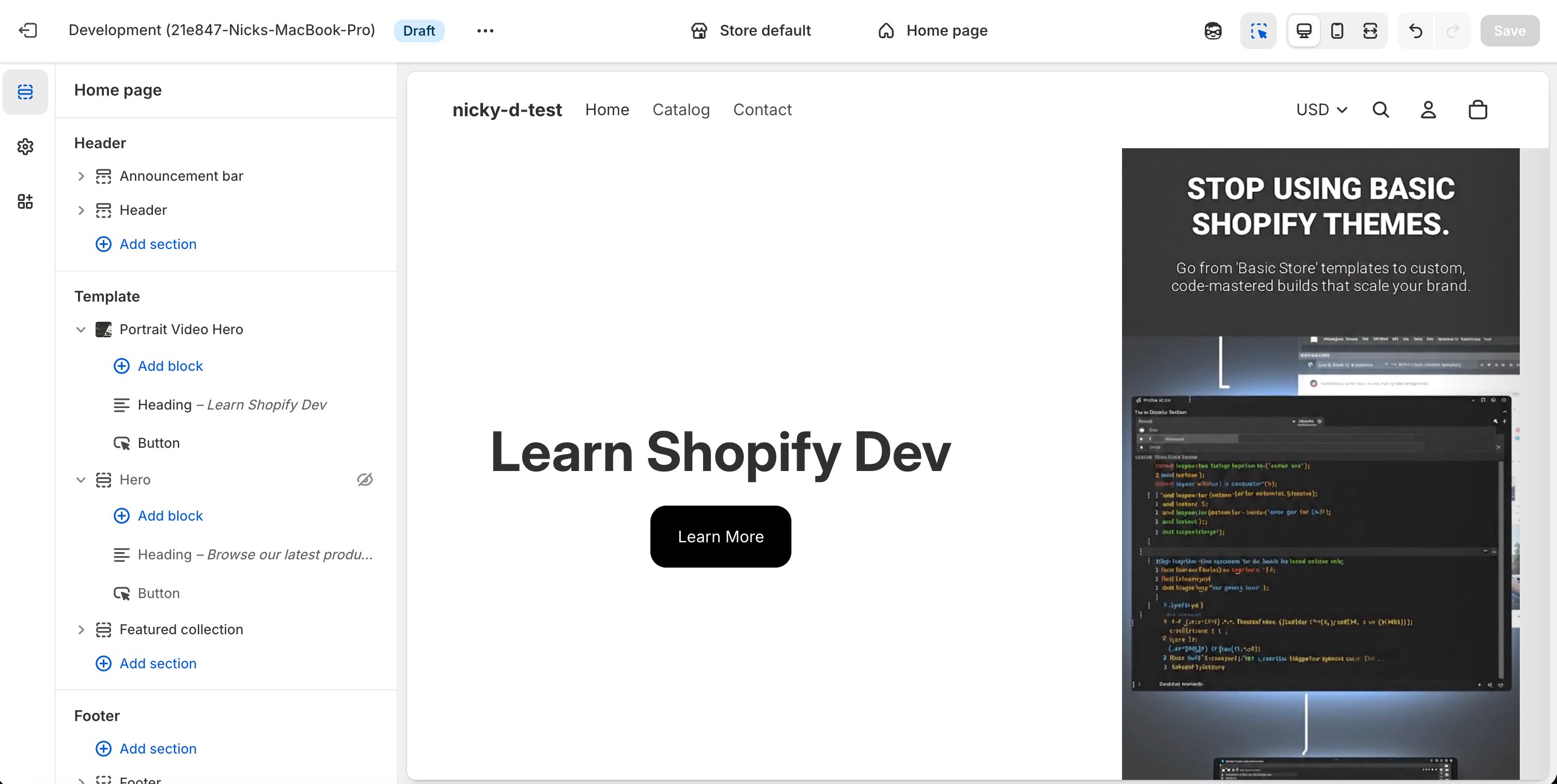
Short-form, vertical video has become one of the most effective ways to grab attention online — and now you can bring that same format directly into your Shopify storefront.
In this tutorial, I’ll show you how to:
-
Generate a portrait (vertical) video using Google Labs’ Pomelli tool
-
Upload that video to Shopify
-
Add a custom Portrait Video Hero section to your theme
-
Fully customize layout, spacing, and mobile behavior — without installing an app
If you prefer video walkthroughs, I’ve also published a step-by-step YouTube tutorial that walks through this entire process visually.
Code: https://github.com/ndrishinski/blogs/blob/master/video-animation/sections/video-animation.liquid
Why Use a Portrait Video Hero Section?
Most Shopify themes are optimized for horizontal banners, but vertical video offers a few key advantages:
-
📱 Perfect for mobile-first shoppers
-
🎯 Feels native to TikTok, Reels, and Shorts audiences
-
🚀 Immediately captures attention above the fold
-
🧠 Great for storytelling, product demos, or brand vibes
By combining AI-generated video with a custom Shopify section, you get full creative control — and zero monthly app fees.
Step 1: Generate Your Video Using Google Labs Pomelli
Google Labs’ Pomelli tool lets you generate short AI videos from text prompts.
When creating your video, keep these tips in mind:
-
Aspect ratio: Vertical / portrait (9:16)
-
Length: 5–10 seconds works best for hero sections
-
Movement: Subtle motion looks better than fast cuts
-
Prompt clarity: Describe mood, lighting, and subject clearly
Once your video is generated, download it to your computer.
Step 2: Upload the Video to Shopify
-
In your Shopify admin, go to Content → Files
-
Upload the portrait video you generated
-
Shopify will automatically optimize it for streaming
This makes the video available to select directly inside a section setting.
Step 3: Create a New Shopify Section
Now for the fun part — adding the custom section.
-
Go to Online Store → Themes
-
Click … → Edit code
-
Under Sections, click Add a new section
-
Name it something like:
-
Paste in the full section code below
-
Save the file
Portrait Video Hero Section Code
This section supports:
-
Autoplaying, looping, muted portrait video
-
Content on the left, video on the right (desktop)
-
Mobile reordering
-
Adjustable height, spacing, overlay, and color scheme
-
Native Shopify blocks for text and buttons
Important: This uses Shopify’s built-in
videosetting type, not embeds or iframes.{% liquid assign video = section.settings.video assign section_height = section.settings.section_height assign content_alignment = section.settings.content_alignment assign content_width = section.settings.content_width assign video_width = section.settings.video_width assign gap = section.settings.gap assign overlay_opacity = section.settings.overlay_opacity | divided_by: 100.0 assign mobile_video_first = section.settings.mobile_video_first %} <div id="PortraitVideoHero-{{ section.id }}" class="portrait-video-hero color-{{ section.settings.color_scheme }}{% if section.settings.section_height == 'full-screen' %} portrait-video-hero--full-screen{% endif %}" style=" --section-min-height: {% if section_height == 'custom' %}{{ section.settings.section_height_custom }}svh{% elsif section_height == 'full-screen' %}100svh{% else %}var(--section-height-{{ section_height }}){% endif %}; --content-width: {{ content_width }}%; --video-width: {{ video_width }}%; --gap: {{ gap }}px; --overlay-opacity: {{ overlay_opacity }}; --mobile-content-order: {% if mobile_video_first %}2{% else %}1{% endif %}; --mobile-video-order: {% if mobile_video_first %}1{% else %}2{% endif %}; " > <div class="portrait-video-hero__container section section--full-width"> <div class="portrait-video-hero__grid"> {% comment %} Content Area (Left) {% endcomment %} <div class="portrait-video-hero__content" style="{% render 'spacing-style', settings: section.settings %}"> <div class="portrait-video-hero__content-inner" style="align-items: {{ content_alignment }};"> {% content_for 'blocks' %} </div> </div> {% comment %} Video Area (Right) {% endcomment %} <div class="portrait-video-hero__video-wrapper"> {% if video != blank %} {{ video | video_tag: poster: nil, autoplay: true, loop: true, controls: false, muted: true, playsinline: true, class: 'portrait-video-hero__video', data-testid: 'portrait-video-hero-video' }} {% else %} <div class="portrait-video-hero__placeholder-video"> {{ 'hero-apparel-2' | placeholder_svg_tag: 'portrait-video-hero__placeholder-svg' }} <p class="portrait-video-hero__placeholder-text">Upload a portrait video</p> </div> {% endif %} {% if section.settings.show_overlay %} <div class="portrait-video-hero__overlay"></div> {% endif %} </div> </div> </div> </div> {% stylesheet %} .portrait-video-hero { position: relative; min-height: var(--section-min-height); width: 100%; } .portrait-video-hero__container { position: relative; width: 100%; height: 100%; min-height: inherit; } .portrait-video-hero__grid { display: grid; grid-template-columns: var(--content-width) var(--video-width); gap: var(--gap); min-height: inherit; align-items: stretch; } @media screen and (max-width: 749px) { .portrait-video-hero__grid { grid-template-columns: 1fr; grid-template-rows: auto 1fr; } .portrait-video-hero__content { order: var(--mobile-content-order); min-height: auto; padding: 2rem 1.5rem; } .portrait-video-hero__video-wrapper { order: var(--mobile-video-order); min-height: 60vh; margin-top: 10px; } .portrait-video-hero__video { object-fit: cover; } } .portrait-video-hero__content { position: relative; display: flex; align-items: center; justify-content: center; padding: var(--section-padding-block-start, 0) var(--section-padding-inline-start, 0) var(--section-padding-block-end, 0) var(--section-padding-inline-end, 0); z-index: var(--layer-flat); } .portrait-video-hero__content-inner { display: flex; flex-direction: column; gap: 1.5rem; width: 100%; max-width: 100%; text-align: center; } @media screen and (min-width: 750px) { .portrait-video-hero__content-inner { text-align: left; } } .portrait-video-hero__video-wrapper { position: relative; overflow: hidden; background: rgb(var(--color-background)); min-height: 100%; } .portrait-video-hero__video { width: 100%; height: 100%; object-fit: cover; object-position: center center; position: absolute; inset: 0; pointer-events: none; /* Ensure video plays smoothly */ will-change: transform; } .portrait-video-hero--full-screen .portrait-video-hero__video { object-fit: contain; object-position: center top; } .portrait-video-hero__overlay { position: absolute; inset: 0; background: linear-gradient( to left, rgba(0, 0, 0, var(--overlay-opacity)) 0%, transparent 30% ); pointer-events: none; z-index: 1; } .portrait-video-hero__placeholder-video { position: absolute; inset: 0; display: flex; flex-direction: column; align-items: center; justify-content: center; background: rgb(var(--color-background) / 0.5); color: rgb(var(--color-foreground)); gap: 1rem; } .portrait-video-hero__placeholder-svg { width: 200px; height: 200px; opacity: 0.3; } .portrait-video-hero__placeholder-text { font-size: 0.875rem; opacity: 0.7; } .portrait-video-hero__placeholder { text-align: center; padding: 2rem; } /* Ensure content blocks are interactive */ .portrait-video-hero__content { pointer-events: none; } .portrait-video-hero__content * { pointer-events: auto; } /* Design mode adjustments */ .portrait-video-hero__content--design-mode * { pointer-events: auto; } {% endstylesheet %} {% schema %} { "name": "Portrait Video Hero", "tag": "section", "class": "section-wrapper", "settings": [ { "type": "header", "content": "Video" }, { "type": "video", "id": "video", "label": "Portrait Video", "info": "Upload a vertical/portrait video. It will autoplay, loop, and have no controls." }, { "type": "header", "content": "Layout" }, { "type": "select", "id": "section_height", "label": "Section Height", "options": [ { "value": "small", "label": "Small" }, { "value": "medium", "label": "Medium" }, { "value": "large", "label": "Large" }, { "value": "full-screen", "label": "Full Screen" }, { "value": "custom", "label": "Custom" } ], "default": "large" }, { "type": "range", "id": "section_height_custom", "label": "Custom Height", "min": 50, "max": 100, "step": 5, "unit": "svh", "default": 80, "visible_if": "{{ section.settings.section_height == 'custom' }}" }, { "type": "range", "id": "content_width", "label": "Content Width", "min": 30, "max": 70, "step": 5, "unit": "%", "default": 50, "info": "Width of the left content area on desktop" }, { "type": "range", "id": "video_width", "label": "Video Width", "min": 30, "max": 70, "step": 5, "unit": "%", "default": 50, "info": "Width of the right video area on desktop" }, { "type": "range", "id": "gap", "label": "Gap Between Sections", "min": 0, "max": 100, "step": 4, "unit": "px", "default": 0 }, { "type": "checkbox", "id": "mobile_video_first", "label": "Show Video First on Mobile", "default": false, "info": "When enabled, the video appears above the content on mobile devices" }, { "type": "select", "id": "content_alignment", "label": "Content Alignment", "options": [ { "value": "flex-start", "label": "Top" }, { "value": "center", "label": "Center" }, { "value": "flex-end", "label": "Bottom" } ], "default": "center" }, { "type": "header", "content": "Appearance" }, { "type": "color_scheme", "id": "color_scheme", "label": "Color Scheme", "default": "scheme-1" }, { "type": "checkbox", "id": "show_overlay", "label": "Show Gradient Overlay", "default": true, "info": "Adds a subtle gradient overlay on the video for better text readability" }, { "type": "range", "id": "overlay_opacity", "label": "Overlay Opacity", "min": 0, "max": 80, "step": 5, "unit": "%", "default": 20, "visible_if": "{{ section.settings.show_overlay }}" }, { "type": "header", "content": "Spacing" }, { "type": "range", "id": "padding-block-start", "label": "Top Padding", "min": 0, "max": 100, "step": 4, "unit": "px", "default": 40 }, { "type": "range", "id": "padding-block-end", "label": "Bottom Padding", "min": 0, "max": 100, "step": 4, "unit": "px", "default": 40 }, { "type": "range", "id": "padding-inline-start", "label": "Left Padding", "min": 0, "max": 100, "step": 4, "unit": "px", "default": 40 }, { "type": "range", "id": "padding-inline-end", "label": "Right Padding", "min": 0, "max": 100, "step": 4, "unit": "px", "default": 40 } ], "blocks": [ { "type": "text" }, { "type": "button" } ], "presets": [ { "name": "Portrait Video Hero", "category": "Banners", "blocks": { "heading": { "type": "text", "name": "Heading", "settings": { "text": "<h1>Welcome to Our Store</h1>", "type_preset": "h1", "max_width": "normal", "alignment": "center", "width": "100%" } }, "button": { "type": "button", "name": "Button", "settings": { "label": "Shop Now", "link": "shopify://collections/all", "style_class": "button" } } }, "block_order": ["heading", "button"], "settings": { "section_height": "large", "content_width": 50, "video_width": 50, "gap": 0, "content_alignment": "center", "color_scheme": "scheme-1", "show_overlay": true, "overlay_opacity": 20, "padding-block-start": 40, "padding-block-end": 40, "padding-inline-start": 40, "padding-inline-end": 40 } } ] } {% endschema %}
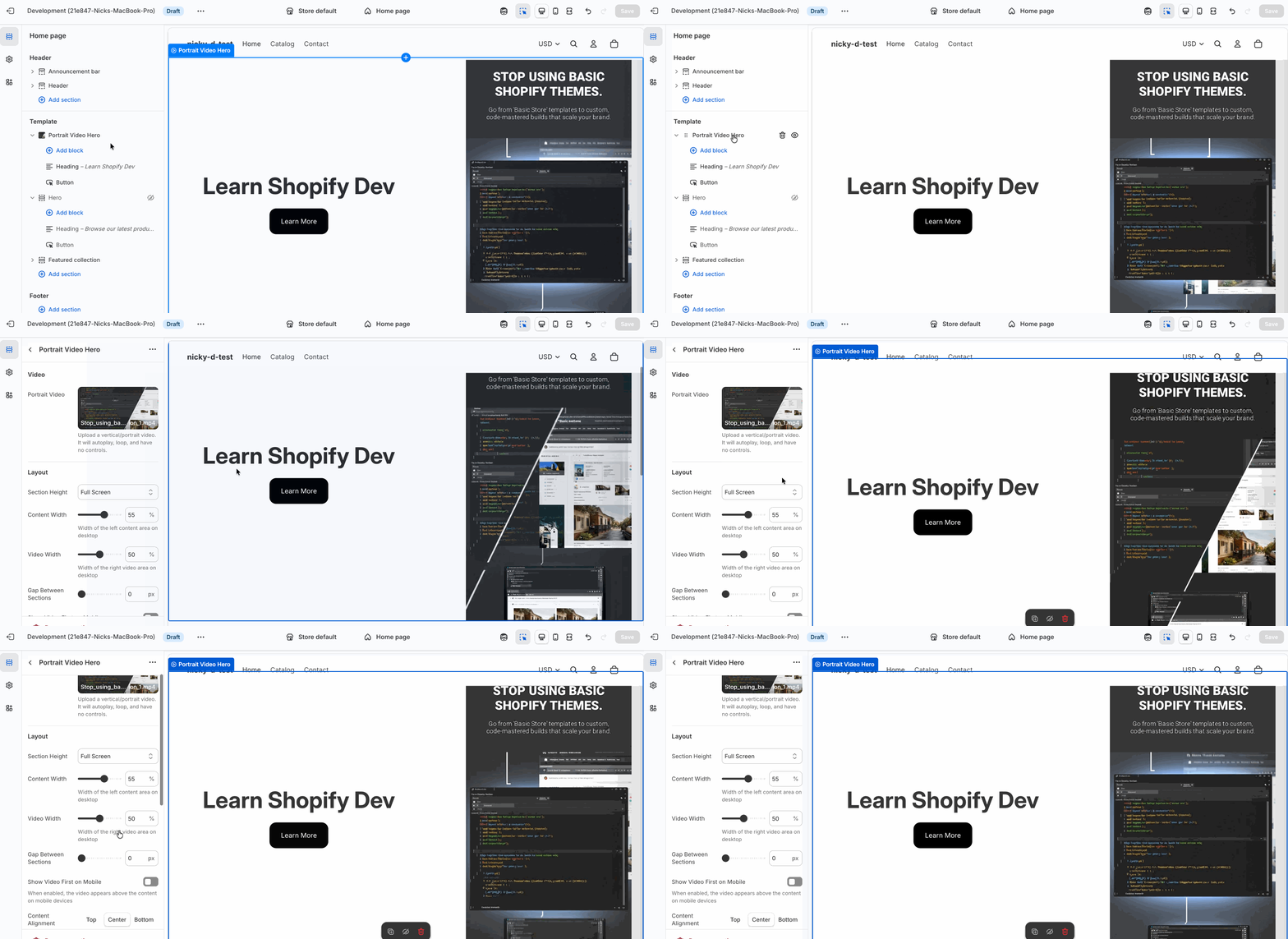
Step 4: Add the Section in the Theme Editor
Once saved:
-
Open Online Store → Customize
-
Navigate to your homepage (or any page)
-
Click Add section
-
Look for Portrait Video Hero
-
Upload your video and customize the settings
You can now:
-
Adjust section height (including full screen)
-
Control content vs video width
-
Toggle a gradient overlay
-
Reorder video and content on mobile
-
Add headings, text, and buttons using blocks
Best Practices for This Section
Here are a few tips to get the best results:
-
✅ Keep text minimal — let the video do the work
-
✅ Use muted autoplay (already handled in the code)
-
✅ Pair with a single strong CTA button
-
✅ Test mobile ordering — video-first often performs better
Final Thoughts
This setup gives you a high-end, app-free, AI-powered hero section that feels modern, fast, and native to Shopify.
It’s also a great example of how AI tools and custom theme development can work together — generate content with AI, then integrate it cleanly using Liquid.
If you found this useful, make sure to check out the YouTube video where I walk through every step visually, and stay tuned for more Shopify section builds like this one.
Happy building 🚀