← Back to blog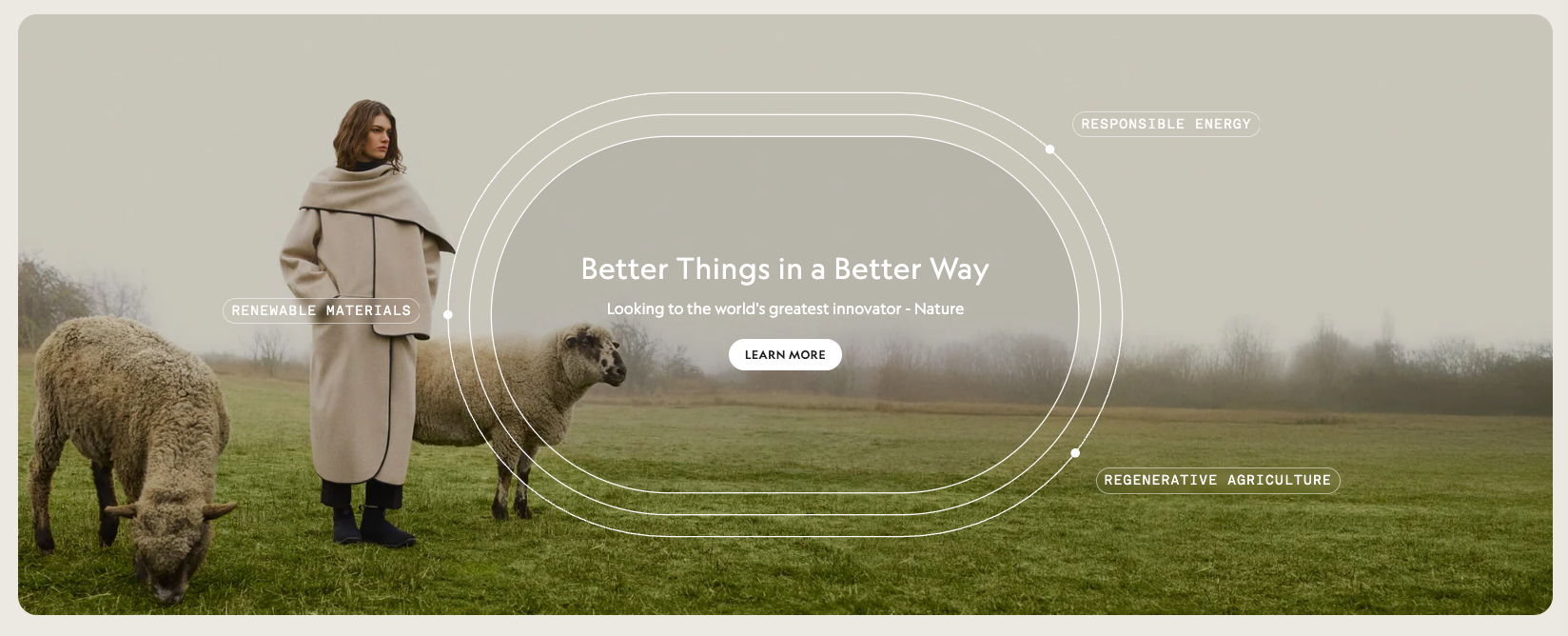
Stop Wasting Your Footer Space - Add These Shopify Sections
By Nicholas Drishinski ·
Are you looking to enhance your Shopify store's footer with beautiful, interactive sections? In this guide, I'll show you how to copy and paste three different footer sections that will transform your store's bottom area into an engaging, conversion-focused space.
Prefer video?
Enjoy, otherwise read on!
What You'll Learn
This guide covers three distinct footer sections:
1. **Accordion Dropdown Section** - Interactive expandable content with rewards, subscriptions, and recycling programs
2. **Featured Collections Showcase** - Product showcase with hover effects and call-to-action buttons
3. **Hero Banner Section** - Full-width banner with customizable background images and overlay text
Prerequisites
Before we begin, make sure you have:
- Access to your Shopify admin panel
- A theme that supports custom sections (most modern themes do)
- Basic knowledge of navigating the Shopify theme editor
Section 1: Accordion Dropdown Footer Section
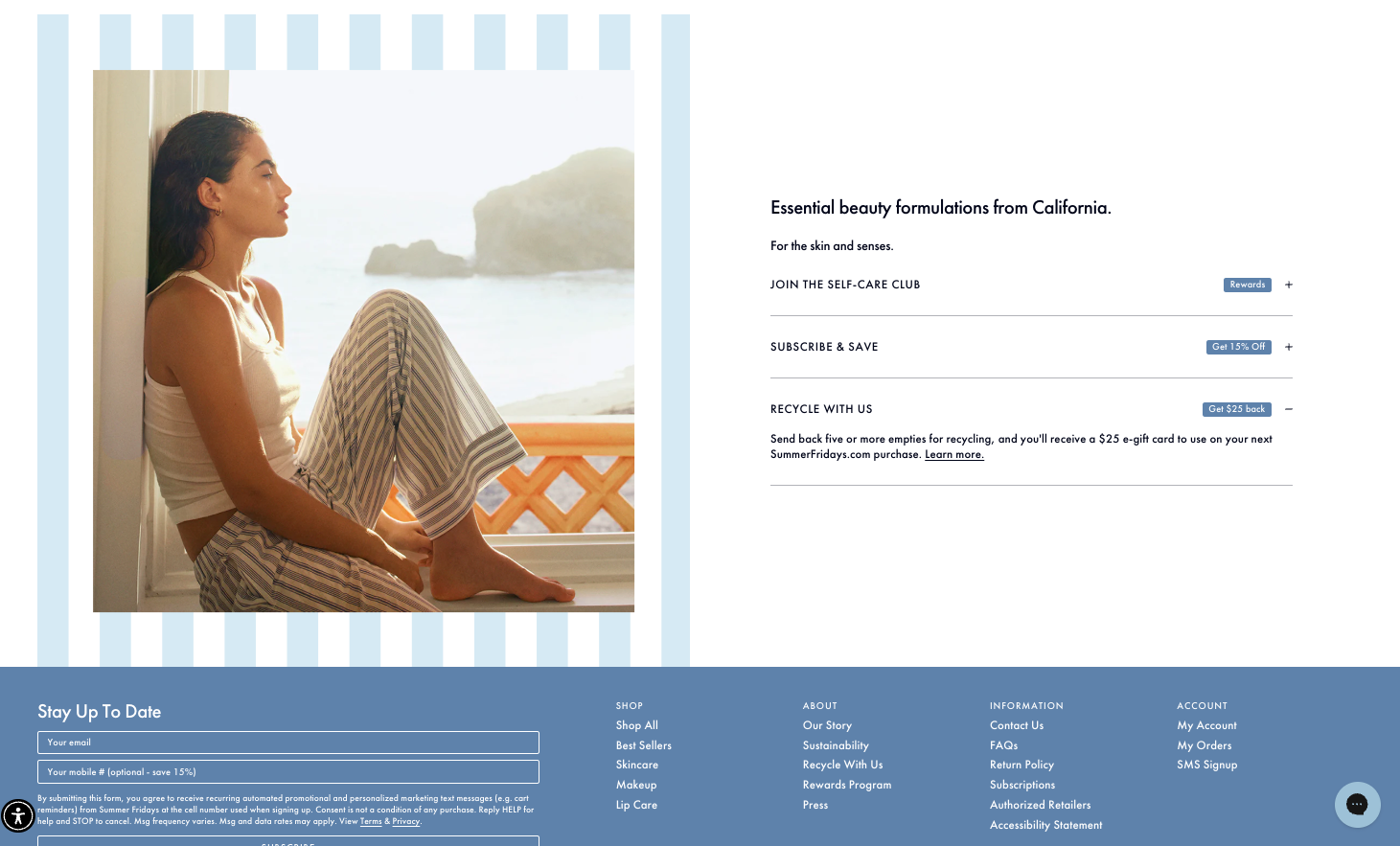
This section creates an elegant two-column layout with an image on the left and interactive accordion content on the right. Perfect for highlighting rewards programs, subscriptions, and sustainability initiatives.
Step 1: Create the Section File
1. Go to your Shopify admin → **Online Store** → **Themes**
2. Click **Actions** → **Edit code**
3. Navigate to the `sections` folder
4. Click **Add a new section**
5. Name it `footer-dropdown.liquid`
6. Copy and paste the following code:
<style>
  .beauty-section {
    display: flex;
    max-height: 700px;
    max-width: 1400px;
    margin: 0 auto;
  }

  .beauty-section__image {
    flex: 1;
    position: relative;
    overflow: hidden;
  }

  .beauty-section__image img {
    width: 100%;
    height: 100%;
    object-fit: cover;
    display: block;
  }

  .beauty-section__content {
    flex: 1;
    background-color: #e8f4f8;
    padding: 80px 60px;
    display: flex;
    flex-direction: column;
    justify-content: center;
  }

  .beauty-section__title {
    font-size: 36px;
    font-weight: 400;
    line-height: 1.2;
    margin-bottom: 20px;
    color: #333;
  }

  .beauty-section__subtitle {
    font-size: 16px;
    margin-bottom: 40px;
    color: #666;
    font-style: italic;
  }

  .beauty-section__item {
    margin-bottom: 30px;
    padding-bottom: 20px;
    border-bottom: 1px solid #d0d0d0;
  }

  .beauty-section__item:last-child {
    border-bottom: none;
    margin-bottom: 0;
  }

  .beauty-section__item-header {
    display: flex;
    align-items: center;
    justify-content: space-between;
    margin-bottom: 10px;
    cursor: pointer;
  }

  .beauty-section__item-title {
    font-size: 14px;
    font-weight: 600;
    letter-spacing: 1px;
    text-transform: uppercase;
    color: #333;
  }

  .beauty-section__badge {
    background-color: #4a90e2;
    color: white;
    padding: 4px 12px;
    font-size: 12px;
    border-radius: 4px;
    font-weight: 500;
  }

  .beauty-section__plus {
    font-size: 24px;
    color: #666;
    cursor: pointer;
    transition: transform 0.3s ease;
    user-select: none;
  }

  .beauty-section__plus.rotated {
    transform: rotate(45deg);
  }

  .beauty-section__description {
    font-size: 14px;
    line-height: 1.5;
    color: #666;
    max-height: 0;
    overflow: hidden;
    transition: max-height 0.3s ease, padding-top 0.3s ease;
  }

  .beauty-section__description.expanded {
    max-height: 200px;
    padding-top: 10px;
  }

  .beauty-section__link {
    color: #4a90e2;
    text-decoration: underline;
  }

  @media (max-width: 768px) {
    .beauty-section {
      flex-direction: column;
      min-height: auto;
      max-height: none;
    }

    .beauty-section__image {
      height: 500px;
      min-height: 400px;
    }

    .beauty-section__content {
      padding: 40px 30px;
    }

    .beauty-section__title {
      font-size: 28px;
    }
  }

  @media (max-width: 480px) {
    .beauty-section__image {
      height: 400px;
      min-height: 350px;
      max-height: none;
    }

    .beauty-section__content {
      padding: 30px 20px;
    }

    .beauty-section__title {
      font-size: 24px;
    }
  }
</style>

<section class="beauty-section">
  <div class="beauty-section__image">
    {% if section.settings.image %}
      {{ section.settings.image | image_url: width: 700 | image_tag: alt: section.settings.image.alt }}
    {% else %}
      <img src="{{ 'placeholder.svg' | asset_url }}" alt="Beauty formulations" style="width: 100%; height: 100%; object-fit: cover;">
    {% endif %}
  </div>

  <div class="beauty-section__content">
    <h2 class="beauty-section__title">
      {{ section.settings.title | default: "Essential beauty formulations from California." }}
    </h2>

    <p class="beauty-section__subtitle">
      {{ section.settings.subtitle | default: "For the skin and senses." }}
    </p>

    <div class="beauty-section__item">
      <div class="beauty-section__item-header" onclick="toggleAccordion(this)">
        <h3 class="beauty-section__item-title">
          {{ section.settings.rewards_title | default: "JOIN THE SELF-CARE CLUB" }}
        </h3>
        <div style="display: flex; align-items: center; gap: 10px;">
          <span class="beauty-section__badge">
            {{ section.settings.rewards_badge | default: "Rewards" }}
          </span>
          <span class="beauty-section__plus">+</span>
        </div>
      </div>
      <div class="beauty-section__description">
        {{ section.settings.rewards_description | default: "Earn points every time you shop when you join our rewards program. Redeem points for exclusive discounts, early access to sales and free products." }}
        {% if section.settings.rewards_link_text %}
          <a href="{{ section.settings.rewards_link_url }}" class="beauty-section__link">
            {{ section.settings.rewards_link_text }}
          </a>
        {% endif %}
      </div>
    </div>

    <div class="beauty-section__item">
      <div class="beauty-section__item-header" onclick="toggleAccordion(this)">
        <h3 class="beauty-section__item-title">
          {{ section.settings.subscribe_title | default: "SUBSCRIBE & SAVE" }}
        </h3>
        <div style="display: flex; align-items: center; gap: 10px;">
          <span class="beauty-section__badge">
            {{ section.settings.subscribe_badge | default: "Get 15% Off" }}
          </span>
          <span class="beauty-section__plus">+</span>
        </div>
      </div>
      <div class="beauty-section__description">
        {{ section.settings.subscribe_description | default: "Save time and money with automatic deliveries. Customize your schedule and never run out of your favorite products." }}
        {% if section.settings.subscribe_link_text %}
          <a href="{{ section.settings.subscribe_link_url }}" class="beauty-section__link">
            {{ section.settings.subscribe_link_text }}
          </a>
        {% endif %}
      </div>
    </div>

    <div class="beauty-section__item">
      <div class="beauty-section__item-header" onclick="toggleAccordion(this)">
        <h3 class="beauty-section__item-title">
          {{ section.settings.recycle_title | default: "RECYCLE WITH US" }}
        </h3>
        <div style="display: flex; align-items: center; gap: 10px;">
          <span class="beauty-section__badge">
            {{ section.settings.recycle_badge | default: "Get $2% back" }}
          </span>
          <span class="beauty-section__plus">+</span>
        </div>
      </div>
      <div class="beauty-section__description">
        {{ section.settings.recycle_description | default: "Send back your empty containers and get rewarded for helping us create a more sustainable future." }}
        {% if section.settings.recycle_link_text %}
          <a href="{{ section.settings.recycle_link_url }}" class="beauty-section__link">
            {{ section.settings.recycle_link_text }}
          </a>
        {% endif %}
      </div>
    </div>
  </div>
</section>

<script>
  function toggleAccordion(header) {
    const description = header.nextElementSibling;
    const plusIcon = header.querySelector('.beauty-section__plus');

    // Toggle the expanded class on description
    description.classList.toggle('expanded');

    // Toggle the rotated class on plus icon
    plusIcon.classList.toggle('rotated');
  }
</script>

{% schema %}
{
  "name": "Footer Dropdown",
  "settings": [
    {
      "type": "image_picker",
      "id": "image",
      "label": "Section Image"
    },
    {
      "type": "text",
      "id": "title",
      "label": "Main Title",
      "default": "Essential beauty formulations from California."
    },
    {
      "type": "text",
      "id": "subtitle",
      "label": "Subtitle",
      "default": "For the skin and senses."
    },
    {
      "type": "header",
      "content": "Rewards Section"
    },
    {
      "type": "text",
      "id": "rewards_title",
      "label": "Rewards Section Title",
      "default": "JOIN THE SELF-CARE CLUB"
    },
    {
      "type": "text",
      "id": "rewards_badge",
      "label": "Rewards Badge Text",
      "default": "Rewards"
    },
    {
      "type": "textarea",
      "id": "rewards_description",
      "label": "Rewards Description",
      "default": "Earn points every time you shop when you join our rewards program. Redeem points for exclusive discounts, early access to sales and free products."
    },
    {
      "type": "text",
      "id": "rewards_link_text",
      "label": "Rewards Link Text"
    },
    {
      "type": "url",
      "id": "rewards_link_url",
      "label": "Rewards Link URL"
    },
    {
      "type": "header",
      "content": "Subscribe Section"
    },
    {
      "type": "text",
      "id": "subscribe_title",
      "label": "Subscribe Section Title",
      "default": "SUBSCRIBE & SAVE"
    },
    {
      "type": "text",
      "id": "subscribe_badge",
      "label": "Subscribe Badge Text",
      "default": "Get 15% Off"
    },
    {
      "type": "textarea",
      "id": "subscribe_description",
      "label": "Subscribe Description",
      "default": "Save time and money with automatic deliveries. Customize your schedule and never run out of your favorite products."
    },
    {
      "type": "text",
      "id": "subscribe_link_text",
      "label": "Subscribe Link Text"
    },
    {
      "type": "url",
      "id": "subscribe_link_url",
      "label": "Subscribe Link URL"
    },
    {
      "type": "header",
      "content": "Recycle Section"
    },
    {
      "type": "text",
      "id": "recycle_title",
      "label": "Recycle Section Title",
      "default": "RECYCLE WITH US"
    },
    {
      "type": "text",
      "id": "recycle_badge",
      "label": "Recycle Badge Text",
      "default": "Get $2% back"
    },
    {
      "type": "textarea",
      "id": "recycle_description",
      "label": "Recycle Description",
      "default": "Send back your empty containers and get rewarded for helping us create a more sustainable future."
    },
    {
      "type": "text",
      "id": "recycle_link_text",
      "label": "Recycle Link Text"
    },
    {
      "type": "url",
      "id": "recycle_link_url",
      "label": "Recycle Link URL"
    }
  ],
  "presets": [
    {
      "name": "Footer Dropdown"
    }
  ]
}
{% endschema %}
Step 2: Add the Section to Your Footer
1. Go to **Online Store** → **Themes** → **Customize**
2. Navigate to your footer template
3. Click **Add section**
4. Select **Footer Dropdown** from the list
5. Configure the settings in the sidebar
Customization Tips for Accordion Section
- **Image**: Upload a high-quality image (recommended size: 700x700px)
- **Colors**: Modify the CSS variables to match your brand colors
- **Content**: Update the rewards, subscription, and recycling program details
- **Links**: Add relevant URLs for each section's call-to-action
Section 2: Featured Collections Showcase
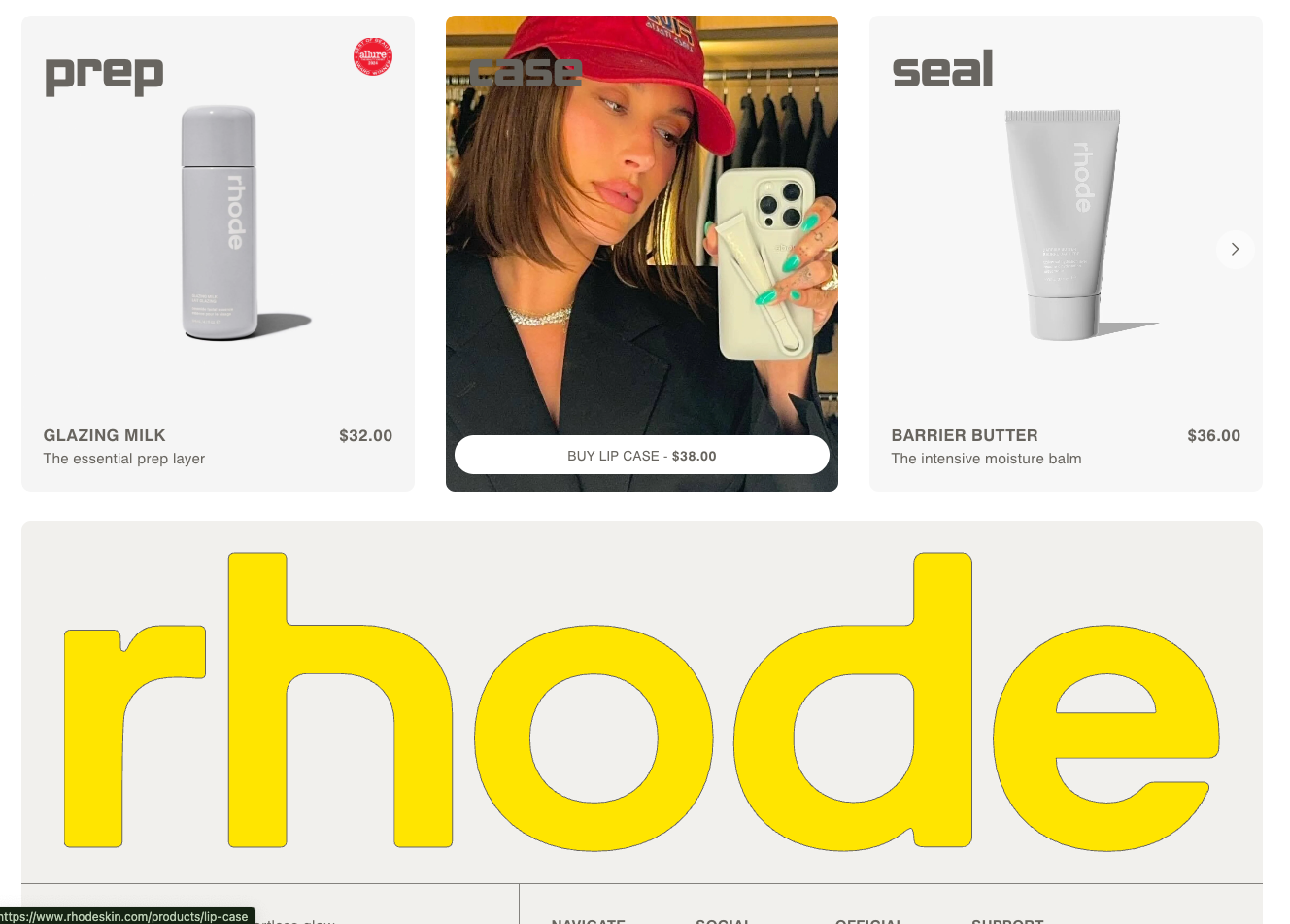
This section creates a horizontal scrolling showcase of featured products or collections with hover effects and promotional badges.
Step 1: Create the Section File
1. Create a new section file named `footer-shopping-showcase.liquid`
2. Copy and paste the following code:
<style>
  .product-showcase {
    max-height: 611px;
    padding: 40px 20px;
    overflow: hidden;
  }

  .product-showcase__container {
    display: flex;
    justify-content: center;
    align-items: center;
    gap: 30px;
    max-width: 1200px;
    margin: 0 auto;
    height: 100%;
  }

  .product-showcase__item {
    position: relative;
    width: 400px;
    height: 500px;
    border-radius: 12px;
    overflow: hidden;
    cursor: pointer;
    transition: transform 0.3s ease;
  }

  .product-showcase__item:hover {
    transform: translateY(-5px);
  }

  .product-showcase__image {
    width: 100%;
    height: 100%;
    object-fit: cover;
    transition: opacity 0.3s ease;
  }

  .product-showcase__image--hover {
    position: absolute;
    top: 0;
    left: 0;
    opacity: 0;
    transition: opacity 0.3s ease;
  }

  .product-showcase__item:hover .product-showcase__image--hover {
    opacity: 1;
  }

  .product-showcase__item:hover .product-showcase__image--main {
    opacity: 0;
  }

  .product-showcase__content {
    position: absolute;
    bottom: 0;
    left: 0;
    right: 0;
    background: linear-gradient(transparent, rgba(0, 0, 0, 0.7));
    padding: 60px 30px 30px;
    color: white;
  }

  .product-showcase__category {
    font-size: 48px;
    font-weight: bold;
    text-transform: lowercase;
    margin-bottom: 10px;
    opacity: 0.9;
  }

  .product-showcase__title {
    font-size: 16px;
    font-weight: 600;
    text-transform: uppercase;
    letter-spacing: 1px;
    margin-bottom: 5px;
  }

  .product-showcase__description {
    font-size: 14px;
    opacity: 0.8;
    margin-bottom: 15px;
  }

  .product-showcase__price {
    font-size: 18px;
    font-weight: bold;
    margin-bottom: 15px;
  }

  .product-showcase__button {
    background: white;
    color: black;
    border: none;
    padding: 12px 24px;
    border-radius: 25px;
    font-weight: 600;
    text-transform: uppercase;
    font-size: 12px;
    letter-spacing: 1px;
    cursor: pointer;
    transition: all 0.3s ease;
  }

  .product-showcase__button:hover {
    background: #f0f0f0;
    transform: translateY(-2px);
  }

  .product-showcase__badge {
    position: absolute;
    top: 20px;
    right: 20px;
    width: 60px;
    height: 60px;
    border-radius: 50%;
    background: #e74c3c;
    display: flex;
    align-items: center;
    justify-content: center;
    color: white;
    font-size: 12px;
    font-weight: bold;
    z-index: 2;
  }

  @media (min-width: 768px) {
    .hide-on-desktop {
      display: none;
    }
  }

  /* Mobile Styles */
  @media (max-width: 768px) {
    .product-showcase {
      padding: 20px 0;
      max-height: none;
    }

    .product-showcase__container {
      flex-direction: row;
      justify-content: flex-start;
      overflow-x: auto;
      overflow-y: hidden;
      padding: 0 20px;
      gap: 20px;
      scroll-snap-type: x mandatory;
      -webkit-overflow-scrolling: touch;
      margin-left: 20px;
    }

    .product-showcase__container::-webkit-scrollbar {
      display: none;
    }

    .product-showcase__item {
      flex-shrink: 0;
      width: 280px;
      height: 400px;
      scroll-snap-align: start;
    }

    .product-showcase__item:hover .product-showcase__image--hover {
      opacity: 0;
    }

    .product-showcase__item:hover .product-showcase__image--main {
      opacity: 1;
    }

    .product-showcase__category {
      font-size: 36px;
    }

    .product-showcase__content {
      padding: 40px 20px 20px;
    }
  }
</style>

<section class="product-showcase">
  <div class="product-showcase__container">
    {% for block in section.blocks %}
      <div class="product-showcase__item {% if forloop.index >= 4 %}hide-on-desktop {% endif %}" {{ block.shopify_attributes }}>
        {% if block.settings.badge_text != blank %}
          <div class="product-showcase__badge">
            {{ block.settings.badge_text }}
          </div>
        {% endif %}

        {% if block.settings.image != blank %}
          <img
            class="product-showcase__image product-showcase__image--main"
            src="{{ block.settings.image | img_url: '700x900' }}"
            alt="{{ block.settings.image.alt | default: block.settings.title }}"
            loading="lazy"
          >
        {% endif %}

        {% if block.settings.hover_image != blank %}
          <img
            class="product-showcase__image product-showcase__image--hover"
            src="{{ block.settings.hover_image | img_url: '700x900' }}"
            alt="{{ block.settings.hover_image.alt | default: block.settings.title }}"
            loading="lazy"
          >
        {% endif %}

        <div class="product-showcase__content">
          {% if block.settings.category != blank %}
            <div class="product-showcase__category">{{ block.settings.category }}</div>
          {% endif %}

          {% if block.settings.title != blank %}
            <h3 class="product-showcase__title">{{ block.settings.title }}</h3>
          {% endif %}

          {% if block.settings.description != blank %}
            <p class="product-showcase__description">{{ block.settings.description }}</p>
          {% endif %}

          {% if block.settings.price != blank %}
            <div class="product-showcase__price">${{ block.settings.price }}</div>
          {% endif %}

          {% if block.settings.button_text != blank %}
            <button class="product-showcase__button" onclick="{% if block.settings.button_url != blank %}window.location.href='{{ block.settings.button_url }}'{% endif %}">
              {{ block.settings.button_text }}
            </button>
          {% endif %}
        </div>
      </div>
    {% endfor %}
  </div>
</section>

{% schema %}
{
  "name": "Footer Showcase",
  "tag": "section",
  "class": "section",
  "settings": [],
  "blocks": [
    {
      "type": "product_item",
      "name": "Product Item",
      "settings": [
        {
          "type": "image_picker",
          "id": "image",
          "label": "Main Image"
        },
        {
          "type": "image_picker",
          "id": "hover_image",
          "label": "Hover Image (Desktop Only)"
        },
        {
          "type": "text",
          "id": "category",
          "label": "Category",
          "default": "prep"
        },
        {
          "type": "text",
          "id": "title",
          "label": "Product Title",
          "default": "Product Name"
        },
        {
          "type": "text",
          "id": "description",
          "label": "Description",
          "default": "Product description"
        },
        {
          "type": "text",
          "id": "price",
          "label": "Price",
          "default": "32.00"
        },
        {
          "type": "text",
          "id": "button_text",
          "label": "Button Text",
          "default": "BUY NOW"
        },
        {
          "type": "url",
          "id": "button_url",
          "label": "Button URL"
        },
        {
          "type": "text",
          "id": "badge_text",
          "label": "Badge Text (Optional)"
        }
      ]
    }
  ],
  "presets": [
    {
      "name": "Footer Showcase",
      "blocks": [
        {
          "type": "product_item",
          "settings": {
            "category": "prep",
            "title": "",
            "description": "Essential skincare prep",
            "price": "32.00",
            "button_text": "BUY GLAZING MILK"
          }
        },
        {
          "type": "product_item",
          "settings": {
            "category": "case",
            "title": "",
            "description": "Your essentials in one place",
            "price": "38.00",
            "button_text": "SHOP CASE"
          }
        },
        {
          "type": "product_item",
          "settings": {
            "category": "seal",
            "title": "",
            "description": "The intensive moisture balm",
            "price": "36.00",
            "button_text": "BUY BUTTER"
          }
        }
      ]
    }
  ]
}
{% endschema %}
Step 2: Add Products to the Showcase
1. Add the section to your footer template
2. Click **Add block** → **Product Item**
3. Upload images for each product
4. Configure the content for each item
Customization Tips for Showcase Section
- **Images**: Use high-quality product images (700x900px recommended)
- **Hover Images**: Add different images for desktop hover effects
- **Badges**: Use promotional badges like "SALE", "NEW", or "LIMITED"
- **Mobile**: The section automatically becomes horizontally scrollable on mobile
Section 3: Hero Banner Footer Section
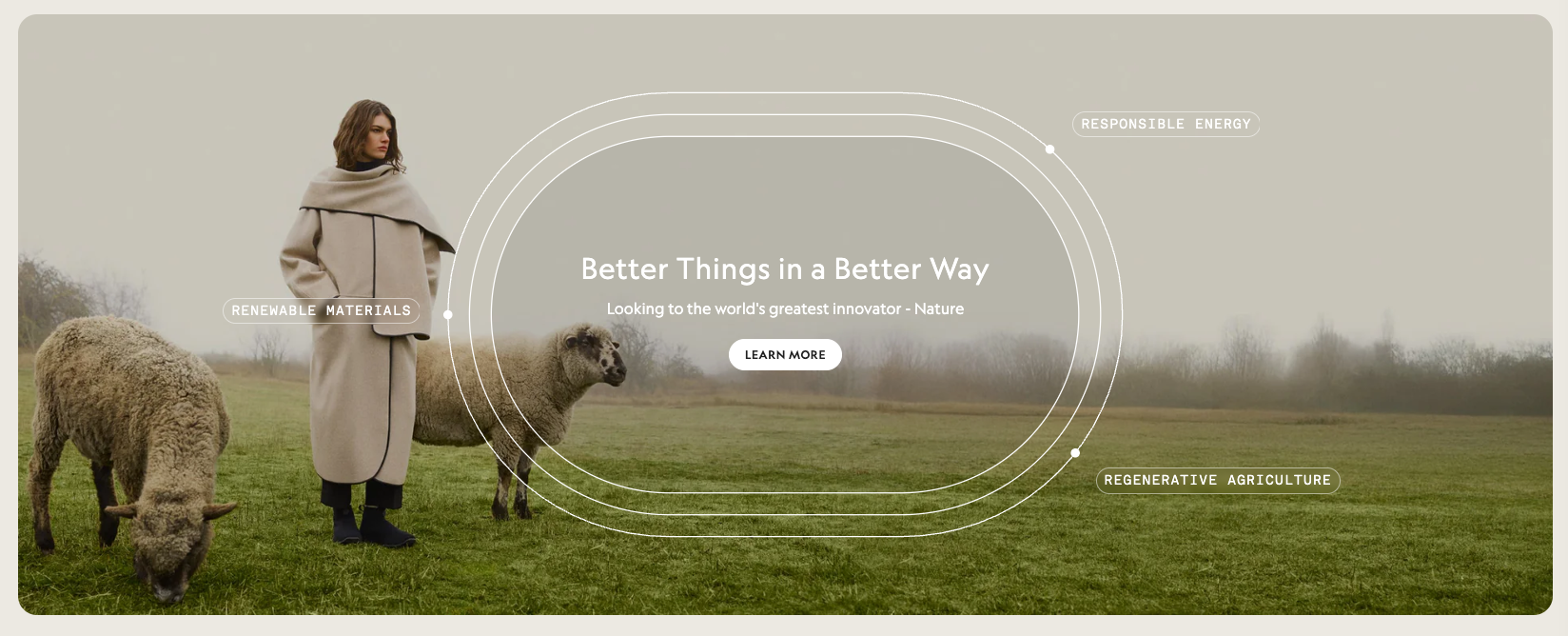
This section creates a full-width banner with background images, overlay text, and customizable styling options.
Step 1: Create the Section File
1. Create a new section file named `footer-image.liquid`
2. Copy and paste the following code:
<style>
  .hero-section {
    position: relative;
    width: 100%;
    max-height: 630px;
    height: 630px;
    overflow: hidden;
    display: flex;
    align-items: center;
    justify-content: center;
  }

  .hero-background {
    position: absolute;
    top: 0;
    left: 0;
    width: 100%;
    height: 100%;
    object-fit: cover;
    z-index: 1;
  }

  .hero-overlay {
    position: absolute;
    top: 0;
    left: 0;
    width: 100%;
    height: 100%;
    background: rgba(0, 0, 0, {{ section.settings.overlay_opacity | divided_by: 100.0 }});
    z-index: 2;
  }

  .hero-content {
    position: relative;
    z-index: 3;
    text-align: center;
    color: {{ section.settings.text_color }}!important;
    max-width: 800px;
    padding: 0 20px;
  }

  .hero-heading {
    color: {{ section.settings.text_color }}!important;
    font-size: {{ section.settings.heading_size }}px;
    font-weight: {{ section.settings.heading_weight }};
    margin: 0 0 16px 0;
    line-height: 1.2;
  }

  .hero-subtext {
    font-size: {{ section.settings.subtext_size }}px;
    margin: 0 0 32px 0;
    opacity: 0.9;
    line-height: 1.4;
  }

  .hero-button {
    display: inline-block;
    padding: {{ section.settings.button_padding_vertical }}px {{ section.settings.button_padding_horizontal }}px;
    background-color: {{ section.settings.button_bg_color }};
    color: {{ section.settings.button_text_color }};
    text-decoration: none;
    border-radius: {{ section.settings.button_border_radius }}px;
    font-size: {{ section.settings.button_text_size }}px;
    font-weight: {{ section.settings.button_font_weight }};
    text-transform: uppercase;
    letter-spacing: 1px;
    transition: all 0.3s ease;
    border: {{ section.settings.button_border_width }}px solid {{ section.settings.button_border_color }};
  }

  .hero-button:hover {
    background-color: {{ section.settings.button_hover_bg_color }};
    color: {{ section.settings.button_hover_text_color }};
    transform: translateY(-2px);
  }

  .decorative-elements {
    position: absolute;
    top: 0;
    left: 0;
    width: 100%;
    height: 100%;
    z-index: 2;
    pointer-events: none;
  }

  .oval-lines {
    position: absolute;
    top: 50%;
    left: 50%;
    transform: translate(-50%, -50%);
    width: 600px;
    height: 400px;
  }

  .oval-line {
    position: absolute;
    border: 2px solid rgba(255, 255, 255, 0.3);
    border-radius: 50%;
    width: 100%;
    height: 100%;
  }

  .oval-line:nth-child(2) {
    width: 120%;
    height: 120%;
    top: -10%;
    left: -10%;
  }

  .oval-line:nth-child(3) {
    width: 140%;
    height: 140%;
    top: -20%;
    left: -20%;
  }

  .feature-label {
    position: absolute;
    background: rgba(255, 255, 255, 0.9);
    padding: 8px 16px;
    border-radius: 20px;
    font-size: 12px;
    font-weight: 600;
    text-transform: uppercase;
    letter-spacing: 1px;
    color: #333;
  }

  .label-1 {
    top: 20%;
    left: 15%;
  }

  .label-2 {
    top: 15%;
    right: 15%;
  }

  .label-3 {
    bottom: 20%;
    right: 10%;
  }

  /* Mobile Styles */
  @media (max-width: 768px) {
    .hero-section {
      max-height: 460px;
      height: 460px;
    }

    .hero-background.desktop {
      display: none;
    }

    .hero-background.mobile {
      display: block;
    }

    .hero-heading {
      font-size: {{ section.settings.heading_size_mobile }}px;
    }

    .hero-subtext {
      font-size: {{ section.settings.subtext_size_mobile }}px;
      margin-bottom: 24px;
    }

    .oval-lines {
      width: 400px;
      height: 300px;
    }

    .feature-label {
      font-size: 10px;
      padding: 6px 12px;
    }

    .label-1 {
      top: 15%;
      left: 10%;
    }

    .label-2 {
      top: 10%;
      right: 10%;
    }

    .label-3 {
      bottom: 15%;
      right: 5%;
    }
  }

  @media (min-width: 769px) {
    .hero-background.mobile {
      display: none;
    }

    .hero-background.desktop {
      display: block;
    }
  }
</style>

<section class="hero-section">
  {% if section.settings.desktop_image %}
    <img
      src="{{ section.settings.desktop_image | img_url: '1920x630' }}"
      alt="{{ section.settings.desktop_image.alt | escape }}"
      class="hero-background desktop"
    >
  {% endif %}

  {% if section.settings.mobile_image %}
    <img
      src="{{ section.settings.mobile_image | img_url: '768x460' }}"
      alt="{{ section.settings.mobile_image.alt | escape }}"
      class="hero-background mobile"
    >
  {% endif %}

  {% if section.settings.show_overlay %}
    <div class="hero-overlay"></div>
  {% endif %}


  <div class="hero-content">
    {% if section.settings.heading_text != blank %}
      <h1 class="hero-heading">{{ section.settings.heading_text }}</h1>
    {% endif %}

    {% if section.settings.subtext != blank %}
      <p class="hero-subtext">{{ section.settings.subtext }}</p>
    {% endif %}

    {% if section.settings.button_text != blank and section.settings.button_url != blank %}
      <a href="{{ section.settings.button_url }}" class="hero-button">
        {{ section.settings.button_text }}
      </a>
    {% endif %}
  </div>
</section>

{% schema %}
{
  "name": "Footer Hero Section",
  "settings": [
    {
      "type": "header",
      "content": "Images"
    },
    {
      "type": "image_picker",
      "id": "desktop_image",
      "label": "Desktop Background Image"
    },
    {
      "type": "image_picker",
      "id": "mobile_image",
      "label": "Mobile Background Image"
    },
    {
      "type": "header",
      "content": "Content"
    },
    {
      "type": "text",
      "id": "heading_text",
      "label": "Heading Text",
      "default": "Better Things in a Better Way"
    },
    {
      "type": "textarea",
      "id": "subtext",
      "label": "Subtext",
      "default": "Looking to the world's greatest innovator - Nature"
    },
    {
      "type": "text",
      "id": "button_text",
      "label": "Button Text",
      "default": "LEARN MORE"
    },
    {
      "type": "url",
      "id": "button_url",
      "label": "Button URL"
    },
    {
      "type": "header",
      "content": "Typography"
    },
    {
      "type": "range",
      "id": "heading_size",
      "min": 24,
      "max": 72,
      "step": 2,
      "unit": "px",
      "label": "Heading Size (Desktop)",
      "default": 48
    },
    {
      "type": "range",
      "id": "heading_size_mobile",
      "min": 20,
      "max": 48,
      "step": 2,
      "unit": "px",
      "label": "Heading Size (Mobile)",
      "default": 32
    },
    {
      "type": "select",
      "id": "heading_weight",
      "label": "Heading Font Weight",
      "options": [
        { "value": "300", "label": "Light" },
        { "value": "400", "label": "Normal" },
        { "value": "500", "label": "Medium" },
        { "value": "600", "label": "Semi Bold" },
        { "value": "700", "label": "Bold" }
      ],
      "default": "600"
    },
    {
      "type": "range",
      "id": "subtext_size",
      "min": 12,
      "max": 24,
      "step": 1,
      "unit": "px",
      "label": "Subtext Size (Desktop)",
      "default": 18
    },
    {
      "type": "range",
      "id": "subtext_size_mobile",
      "min": 12,
      "max": 20,
      "step": 1,
      "unit": "px",
      "label": "Subtext Size (Mobile)",
      "default": 16
    },
    {
      "type": "header",
      "content": "Colors"
    },
    {
      "type": "color",
      "id": "text_color",
      "label": "Text Color",
      "default": "#ffffff"
    },
    {
      "type": "checkbox",
      "id": "show_overlay",
      "label": "Show Background Overlay",
      "default": true
    },
    {
      "type": "range",
      "id": "overlay_opacity",
      "min": 0,
      "max": 80,
      "step": 5,
      "unit": "%",
      "label": "Overlay Opacity",
      "default": 20
    },
    {
      "type": "header",
      "content": "Button Styling"
    },
    {
      "type": "color",
      "id": "button_bg_color",
      "label": "Button Background Color",
      "default": "#ffffff"
    },
    {
      "type": "color",
      "id": "button_text_color",
      "label": "Button Text Color",
      "default": "#333333"
    },
    {
      "type": "color",
      "id": "button_hover_bg_color",
      "label": "Button Hover Background Color",
      "default": "#f0f0f0"
    },
    {
      "type": "color",
      "id": "button_hover_text_color",
      "label": "Button Hover Text Color",
      "default": "#333333"
    },
    {
      "type": "color",
      "id": "button_border_color",
      "label": "Button Border Color",
      "default": "#ffffff"
    },
    {
      "type": "range",
      "id": "button_border_width",
      "min": 0,
      "max": 5,
      "step": 1,
      "unit": "px",
      "label": "Button Border Width",
      "default": 0
    },
    {
      "type": "range",
      "id": "button_border_radius",
      "min": 0,
      "max": 50,
      "step": 2,
      "unit": "px",
      "label": "Button Border Radius",
      "default": 24
    },
    {
      "type": "range",
      "id": "button_padding_vertical",
      "min": 8,
      "max": 24,
      "step": 2,
      "unit": "px",
      "label": "Button Vertical Padding",
      "default": 14
    },
    {
      "type": "range",
      "id": "button_padding_horizontal",
      "min": 16,
      "max": 48,
      "step": 2,
      "unit": "px",
      "label": "Button Horizontal Padding",
      "default": 32
    },
    {
      "type": "range",
      "id": "button_text_size",
      "min": 12,
      "max": 20,
      "step": 1,
      "unit": "px",
      "label": "Button Text Size",
      "default": 14
    },
    {
      "type": "select",
      "id": "button_font_weight",
      "label": "Button Font Weight",
      "options": [
        { "value": "400", "label": "Normal" },
        { "value": "500", "label": "Medium" },
        { "value": "600", "label": "Semi Bold" },
        { "value": "700", "label": "Bold" }
      ],
      "default": "600"
    },
    {
      "type": "header",
      "content": "Decorative Elements"
    }
  ],
  "presets": [
    {
      "name": "Footer Hero Section"
    }
  ]
}
{% endschema %}
Step 2: Configure the Hero Banner
1. Add the section to your footer template
2. Upload desktop and mobile background images
3. Customize the text content and styling options
Customization Tips for Hero Banner
- **Images**: Use high-quality images (1920x630px for desktop, 768x460px for mobile)
- **Overlay**: Adjust the overlay opacity to ensure text readability
- **Typography**: Experiment with different font sizes and weights
- **Button**: Customize button colors and styling to match your brand
Adding Sections to Your Footer Template
1. Go to **Online Store** → **Themes** → **Customize**
2. Navigate to your footer template
3. Click **Add section** for each section you want to add
4. Arrange the sections in your desired order
Conclusion
These three footer sections provide a solid foundation for creating an engaging, conversion-focused footer for your Shopify store. By following this guide, you can easily implement professional-looking footer sections that enhance user experience and drive sales.