← Back to blog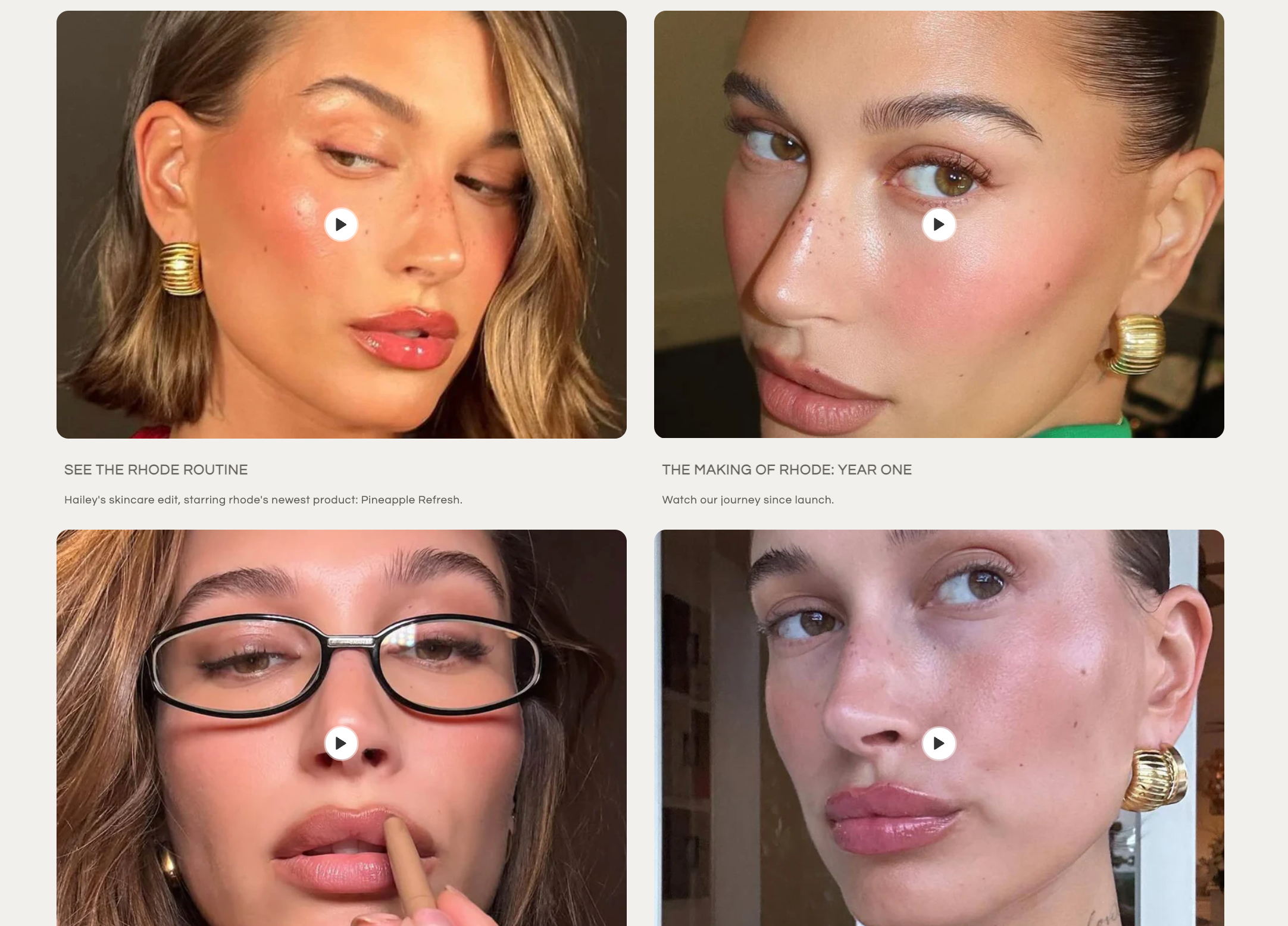
Want to showcase YouTube videos or uploaded video files in a beautiful, flexible grid on your Shopify store? With this custom section, you can easily add a “Vlog” or “Media” grid to any page, letting you mix YouTube embeds and direct video uploads, each with custom thumbnails, titles, and descriptions.
Follow this step-by-step guide to add the section to your theme and start featuring your favorite videos!
Code: https://github.com/ndrishinski/blogs/blob/master/vlog-section/sections/vlog-section.liquid
Enjoy, otherwise read on!
First, you’ll need the code for the section. You can copy the code below, or if you already have the vlog-section.liquid file, you’re ready to go!
For each video card, you can:
You can add as many video blocks as you like!
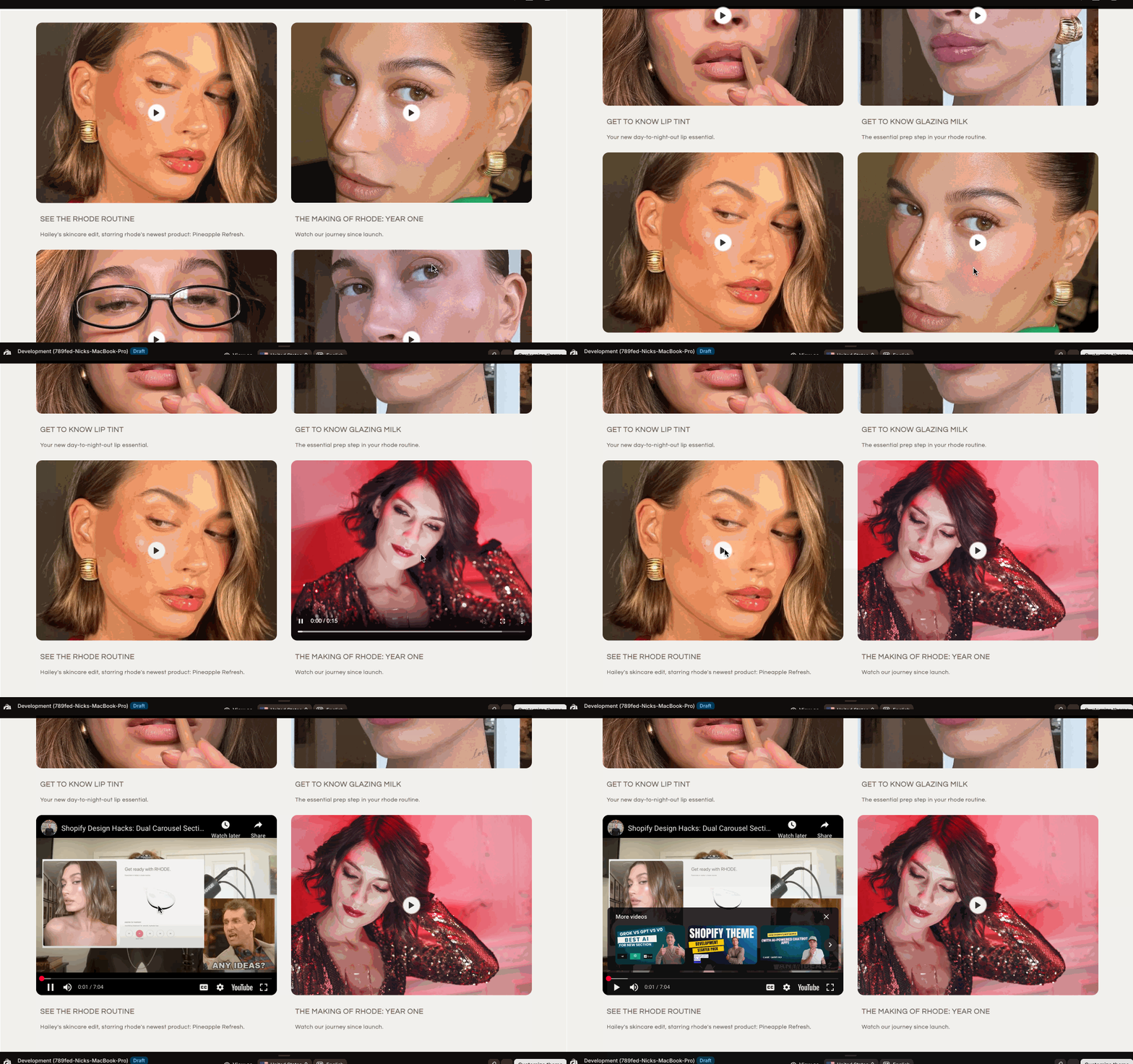
Once you’ve added your videos and customized the section, click Save and preview your store. You’ll see a modern, interactive video grid that works great on desktop and mobile.
With this custom video grid section, you can easily create a dynamic “Vlog” or “Media” area on your Shopify store—perfect for tutorials, product demos, behind-the-scenes content, and more!
If you have any questions or want to customize the section further, let me know in the comments!
Vlog Video Shopify Section Inspired by Hailey Bieber's Rhode
By Nicholas Drishinski ·
Prefer Video?
What You’ll Get
- A responsive grid that displays videos as cards.
- Each card can show either a YouTube video or a direct video upload.
- Custom thumbnails, titles, and descriptions for each video.
- Play button overlay for a modern, interactive feel.
Step 1: Get the Section Code
{% comment %}
  Section for displaying a grid of media items (videos).
  Each media item is a block that can be configured to show either a YouTube video
  or a direct video file, with a custom thumbnail, title, and description.
{% endcomment %}
<link rel="preconnect" href="https://fonts.googleapis.com">
<link rel="preconnect" href="https://fonts.gstatic.com" crossorigin>
<link href="https://fonts.googleapis.com/css2?family=Montserrat:ital,wght@0,100..900;1,100..900&family=Questrial&display=swap" rel="stylesheet">
<div class="media-grid-section">
  <div class="container">
    {% for block in section.blocks %}
      <div class="media-card" {{ block.shopify_attributes }}>
        <div class="video-container">
          {% if block.settings.video_type == 'youtube' %}
            {% assign youtube_id = block.settings.youtube_id %}
            {% if youtube_id != blank %}
              <div class="youtube-embed" data-youtube-id="{{ youtube_id }}">
                {% if block.settings.thumbnail_image != blank %}
                  <img src="{{ block.settings.thumbnail_image | image_url: width: 800 }}"
                       alt="{{ block.settings.title | escape }}"
                       class="video-thumbnail"
                       loading="lazy">
                {% else %}
                  <img src="https://img.youtube.com/vi/{{ youtube_id }}/maxresdefault.jpg"
                       alt="{{ block.settings.title | escape }}"
                       class="video-thumbnail"
                       loading="lazy">
                {% endif %}
                <div class="play-button-overlay">
                  <button class="play-button" aria-label="Play video: {{ block.settings.title | escape }}">
                    <svg xmlns="http://www.w3.org/2000/svg" width="24" height="24" viewBox="0 0 24 24" fill="none" stroke="currentColor" stroke-width="2" stroke-linecap="round" stroke-linejoin="round" class="lucide lucide-play">
                        <polygon points="5 3 19 12 5 21 5 3"/>
                    </svg>
                    <span class="sr-only">Play video</span>
                  </button>
                </div>
                <iframe
                  class="youtube-iframe"
                  src="about:blank"
                  data-src="https://www.youtube.com/embed/{{ youtube_id }}?enablejsapi=1&rel=0&showinfo=0&modestbranding=1"
                  frameborder="0"
                  allow="accelerometer; autoplay; clipboard-write; encrypted-media; gyroscope; picture-in-picture"
                  allowfullscreen
                  loading="lazy"
                  style="display: none;"
                ></iframe>
              </div>
            {% else %}
              {% comment %} {# Placeholder for missing YouTube ID #} {% endcomment %}
              <div class="placeholder-video">
                <img src="/placeholder.svg?height=300&width=400" alt="YouTube video placeholder" class="video-thumbnail">
                <div class="play-button-overlay">
                  <button class="play-button" aria-label="Play video placeholder">
                    <svg xmlns="http://www.w3.org/2000/svg" width="24" height="24" viewBox="0 0 24 24" fill="none" stroke="currentColor" stroke-width="2" stroke-linecap="round" stroke-linejoin="round" class="lucide lucide-play">
                        <polygon points="5 3 19 12 5 21 5 3"/>
                    </svg>
                    <span class="sr-only">Play video</span>
                  </button>
                </div>
              </div>
            {% endif %}
          {% elsif block.settings.video_type == 'file' %}
            {% assign video_file = block.settings.video_file %}
            {% if video_file != blank %}
              <video preload="none"
                     poster="{% if block.settings.thumbnail_image != blank %}{{ block.settings.thumbnail_image | image_url: width: 800 }}{% else %}/placeholder.svg?height=300&width=400&query=video thumbnail{% endif %}"
                     aria-label="Video about {{ block.settings.title | escape }}">
                <source src="{{ video_file.sources[1].url}}" type="video/mp4">
              </video>
              <div class="play-button-overlay">
                <button class="play-button" aria-label="Play video: {{ block.settings.title | escape }}">
                  <svg xmlns="http://www.w3.org/2000/svg" width="24" height="24" viewBox="0 0 24 24" fill="none" stroke="currentColor" stroke-width="2" stroke-linecap="round" stroke-linejoin="round" class="lucide lucide-play">
                      <polygon points="5 3 19 12 5 21 5 3"/>
                  </svg>
                  <span class="sr-only">Play video</span>
                </button>
              </div>
            {% else %}
              {% comment %} {# Placeholder for missing video file #} {% endcomment %}
              <div class="placeholder-video">
                <img src="/placeholder.svg?height=300&width=400" alt="Video file placeholder" class="video-thumbnail">
                <div class="play-button-overlay">
                  <button class="play-button" aria-label="Play video placeholder">
                    <svg xmlns="http://www.w3.org/2000/svg" width="24" height="24" viewBox="0 0 24 24" fill="none" stroke="currentColor" stroke-width="2" stroke-linecap="round" stroke-linejoin="round" class="lucide lucide-play">
                        <polygon points="5 3 19 12 5 21 5 3"/>
                    </svg>
                    <span class="sr-only">Play video</span>
                  </button>
                </div>
              </div>
            {% endif %}
          {% else %}
          {% comment %} {# Default/Fallback if no type selected or invalid #} {% endcomment %}
            <div class="placeholder-video">
              <img src="/placeholder.svg?height=300&width=400" alt="Media item placeholder" class="video-thumbnail">
              <div class="play-button-overlay">
                <button class="play-button" aria-label="Play media placeholder">
                  <svg xmlns="http://www.w3.org/2000/svg" width="24" height="24" viewBox="0 0 24 24" fill="none" stroke="currentColor" stroke-width="2" stroke-linecap="round" stroke-linejoin="round" class="lucide lucide-play">
                      <polygon points="5 3 19 12 5 21 5 3"/>
                  </svg>
                  <span class="sr-only">Play media</span>
                </button>
              </div>
            </div>
          {% endif %}
        </div>
        <div class="card-content">
          <h3>{{ block.settings.title | escape }}</h3>
          <p>{{ block.settings.description }}</p>
        </div>
      </div>
    {% endfor %}
  </div>
</div>

<style>
  .media-grid-section {
      background-color: #f1f0ed;
      padding: 3rem 1rem;
      margin: 0 10px;
  }

  .media-grid-section .container {
      max-width: 90%;
      margin-left: auto;
      margin-right: auto;
      display: grid;
      column-gap: 3.5rem;
      grid-template-columns: 1fr;
  }

  @media (min-width: 640px) {
      .media-grid-section .container {
          grid-template-columns: repeat(2, 1fr);
      }
  }

  @media (min-width: 768px) {
      .media-grid-section {
          padding-left: 1.5rem;
          padding-right: 1.5rem;
      }
  }

  @media (min-width: 1024px) {
      .media-grid-section {
          padding-left: 2rem;
          padding-right: 2rem;
      }
  }

  .media-card {
      overflow: hidden;
  }

  .video-container {
      position: relative;
      width: 100%;
      padding-top: 75%;
      overflow: hidden;
      border-radius: 15px;
  }

  .video-container video,
  .video-container .youtube-iframe,
  .video-container .video-thumbnail,
  .video-container .placeholder-video {
      position: absolute;
      top: 0;
      left: 0;
      width: 100%;
      height: 100%;
      object-fit: cover;
  }

  .play-button-overlay {
      position: absolute;
      inset: 0;
      display: flex;
      align-items: center;
      justify-content: center;
      transition: transform 0.2s ease-in-out;
      cursor: pointer;
      z-index: 10;
  }

  .play-button-overlay:hover {
      transform: scale(1.05);
  }

  .play-button {
      display: flex;
      align-items: center;
      justify-content: center;
      width: 4rem;
      height: 4rem;
      border-radius: 9999px;
      background-color: #ffffff;
      color: #333333;
      border: none;
      cursor: pointer;
      outline: none;
      box-shadow: 0 0 0 2px rgba(255, 255, 255, 0.5);
  }

  .play-button svg {
      width: 2rem;
      height: 2rem;
      fill: currentColor;
  }

  .card-content {
      padding: 1rem;
  }

  .card-content h3 {
      font-size: 18.2px;
      font-weight: 700;
      text-transform: uppercase;
      color: rgb(103, 100, 94);
      margin-bottom: 0.5rem;
      font-family: "Questrial", sans-serif;
      font-style: normal;
  }

  .card-content p {
      font-size: 14px;
      color: rgb(103, 100, 94);
      font-family: "Questrial", sans-serif;
      font-weight: 400;
      font-style: normal;
  }

  .sr-only {
    position: absolute;
    width: 1px;
    height: 1px;
    padding: 0;
    margin: -1px;
    overflow: hidden;
    clip: rect(0, 0, 0, 0);
    white-space: nowrap;
    border-width: 0;
  }
</style>

<script>
  document.addEventListener('DOMContentLoaded', () => {
    // Handle direct video files
    const videoElements = document.querySelectorAll('.media-card video');
    videoElements.forEach(video => {
      const container = video.closest('.video-container');
      const playButtonOverlay = container.querySelector('.play-button-overlay');
      const playButton = container.querySelector('.play-button');

      // Show overlay initially if video is paused (or not yet played)
      if (video.paused) {
        playButtonOverlay.style.display = 'flex';
      }

      playButton.addEventListener('click', () => {
        if (video.paused) {
          video.play();
          playButtonOverlay.style.display = 'none';
          video.setAttribute('controls', ''); // Add controls to the video element
        } else {
          video.pause();
          playButtonOverlay.style.display = 'flex';
        }
      });

      video.addEventListener('play', () => {
        playButtonOverlay.style.display = 'none';
        video.setAttribute('controls', ''); // Add controls to the video element
      });

      video.addEventListener('pause', () => {
        playButtonOverlay.style.display = 'flex';
        video.removeAttribute('controls'); // Remove controls from the video element
      });

      video.addEventListener('ended', () => {
        playButtonOverlay.style.display = 'flex';
        video.load(); // Reset video to show poster again
        video.removeAttribute('controls'); // Remove controls from the video element
      });
    });

    // Handle YouTube videos
    const youtubeEmbeds = document.querySelectorAll('.youtube-embed');
    youtubeEmbeds.forEach(embedContainer => {
      const playButtonOverlay = embedContainer.querySelector('.play-button-overlay');
      const playButton = embedContainer.querySelector('.play-button');
      const youtubeIframe = embedContainer.querySelector('.youtube-iframe');

      // Show overlay initially
      playButtonOverlay.style.display = 'flex';

      playButton.addEventListener('click', () => {
        // Load the YouTube video and play it
        youtubeIframe.src = youtubeIframe.dataset.src + '&autoplay=1'; // Add autoplay
        youtubeIframe.style.display = 'block'; // Show the iframe
        playButtonOverlay.style.display = 'none'; // Hide the overlay
      });
    });
  });
</script>

{% schema %}
{
  "name": "Media Grid",
  "tag": "section",
  "class": "section-media-grid",
  "blocks": [
    {
      "type": "media_item",
      "name": "Media Item",
      "settings": [
        {
          "type": "select",
          "id": "video_type",
          "label": "Video Type",
          "options": [
            { "value": "file", "label": "Video File" },
            { "value": "youtube", "label": "YouTube Video" }
          ],
          "default": "file"
        },
        {
          "type": "video",
          "id": "video_file",
          "label": "Video File",
          "info": "Upload your video file. Only applicable for 'Video File' type."
        },
        {
          "type": "text",
          "id": "youtube_id",
          "label": "YouTube Video ID",
          "info": "Enter the YouTube video ID (e.g., 'dQw4w9WgXcQ'). Only applicable for 'YouTube Video' type."
        },
        {
          "type": "image_picker",
          "id": "thumbnail_image",
          "label": "Thumbnail Image",
          "info": "Optional: Image to display before the video plays. If not provided, a default will be used (YouTube default or generic placeholder)."
        },
        {
          "type": "text",
          "id": "title",
          "label": "Title",
          "default": "Media Item Title"
        },
        {
          "type": "textarea",
          "id": "description",
          "label": "Description",
          "default": "This is a description for the media item."
        }
      ]
    }
  ],
  "presets": [
    {
      "name": "Vlog Grid",
      "blocks": [
        {
          "type": "media_item",
          "settings": {
            "video_type": "file",
            "title": "SEE THE RHODE ROUTINE",
            "description": "Hailey's skincare edit, starring rhode's newest product: Pineapple Refresh."
          }
        },
        {
          "type": "media_item",
          "settings": {
            "video_type": "youtube",
            "youtube_id": "dQw4w9WgXcQ",
            "title": "THE MAKING OF RHODE: YEAR ONE",
            "description": "Watch our journey since launch."
          }
        },
        {
          "type": "media_item",
          "settings": {
            "video_type": "file",
            "title": "GET TO KNOW LIP TINT",
            "description": "Your new day-to-night-out lip essential."
          }
        },
        {
          "type": "media_item",
          "settings": {
            "video_type": "youtube",
            "youtube_id": "dQw4w9WgXcQ",
            "title": "GET TO KNOW GLAZING MILK",
            "description": "The essential prep step in your rhode routine."
          }
        }
      ]
    }
  ]
}
{% endschema %}
Step 2: Add the Section to Your Theme
- Open your Shopify admin and go to Online Store > Themes.
- Click Actions > Edit code on the theme you want to edit.
- In the Sections folder, click Add a new section.
- Name it vlog-section (Shopify will create a file called vlog-section.liquid).
- Paste the code you copied above into this new file and click Save.
Step 3: Add the Section to a Page
- Go back to Online Store > Themes and click Customize on your theme.
- Navigate to the page (e.g., Home page) where you want to add the video grid.
- Click Add section and look for Media Grid or Vlog Grid (the name comes from the section’s schema).
- Add the section to your page.
Step 4: Configure Your Videos
- Choose Video Type: Select either “YouTube Video” or “Video File.”
- YouTube Video: Enter the YouTube video ID (the part after v= in the URL).
- Video File: Upload your video file directly.
- Thumbnail Image (Optional): Upload a custom thumbnail, or let the section use a default.
- Title & Description: Add a catchy title and a short description for each video.
Step 5: Save and Preview
Tips & Customization
- Reorder videos: Drag and drop blocks in the Shopify editor to change the order.
- Style tweaks: You can adjust the CSS in the section file to match your brand.
- Use anywhere: This section can be added to any page that supports Shopify sections.
Troubleshooting
- YouTube videos not playing? Make sure you entered only the video ID, not the full URL.
- Video file not showing? Double-check that you uploaded a supported video format (like MP4).
- Thumbnails missing? If you don’t upload a custom thumbnail, the section will use a default image.
Final Thoughts